
To compare Search Console and GA4 landing-page traffic, export the Pages report from Search Console and the Landing page report from GA4 (filtered to organic Google traffic) for the same dates. Then match the two lists by URL path.
Expect GA4 sessions to be a bit lower than Search Console clicks on most pages. What matters are the big gaps, because they usually point to a tracking or URL problem you can fix. The script below does the matching for you and flags those gaps.
You don’t need Looker Studio, BigQuery, or a paid tool. Two CSV files and a short Python script are enough. It’s the same idea we use to join the generative AI report with click data, applied to GA4.
Why the numbers never match
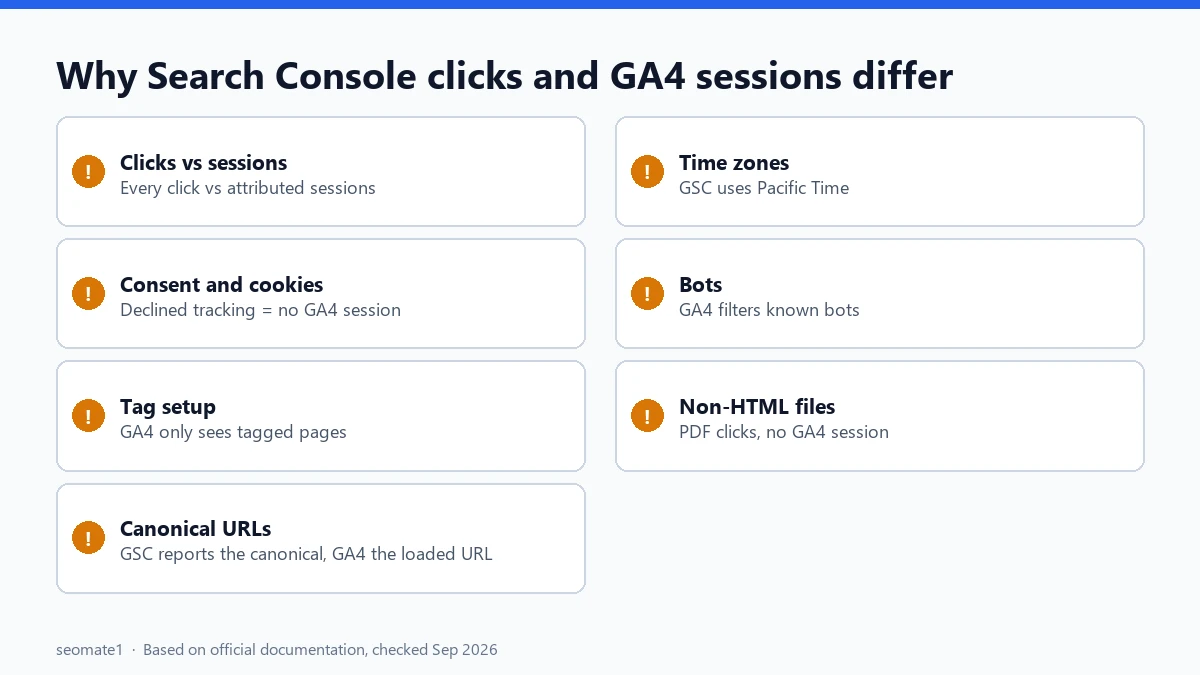
Google’s own guide on using Search Console and Google Analytics data together lists the reasons. In plain terms:
| Reason | What it does to the numbers |
|---|---|
| Clicks vs sessions | Search Console counts every click. GA4 counts sessions, and uses attribution rules. |
| Consent and cookies | People who decline tracking don’t show up in GA4. They still count as clicks. |
| Tag setup | GA4 only sees pages where its tag fires. Search Console sees clicks either way. |
| Canonical URLs | Search Console reports the canonical URL. GA4 reports whatever URL loaded, including parameters. |
| Time zones | Search Console uses Pacific Time. GA4 uses your property’s time zone. |
| Bots | GA4 filters known bots automatically. Search Console doesn’t necessarily. |
| Non-HTML files | PDFs and similar files can get clicks in Search Console but no GA4 session. |
So a gap of 5–15% on a normal page isn’t a problem. That’s our rule of thumb, not a Google figure. A page with 300 clicks and zero sessions is.
Step 1: Export the Search Console Pages report
The screens in this guide are illustrations based on each tool’s standard layout. Labels may differ slightly on your account.
- Open Performance → Search results.
- Set the date range, for example Last 28 days. Note the exact dates, because you’ll match them in GA4.
- Open the Pages tab.
- Click Export → Download CSV.
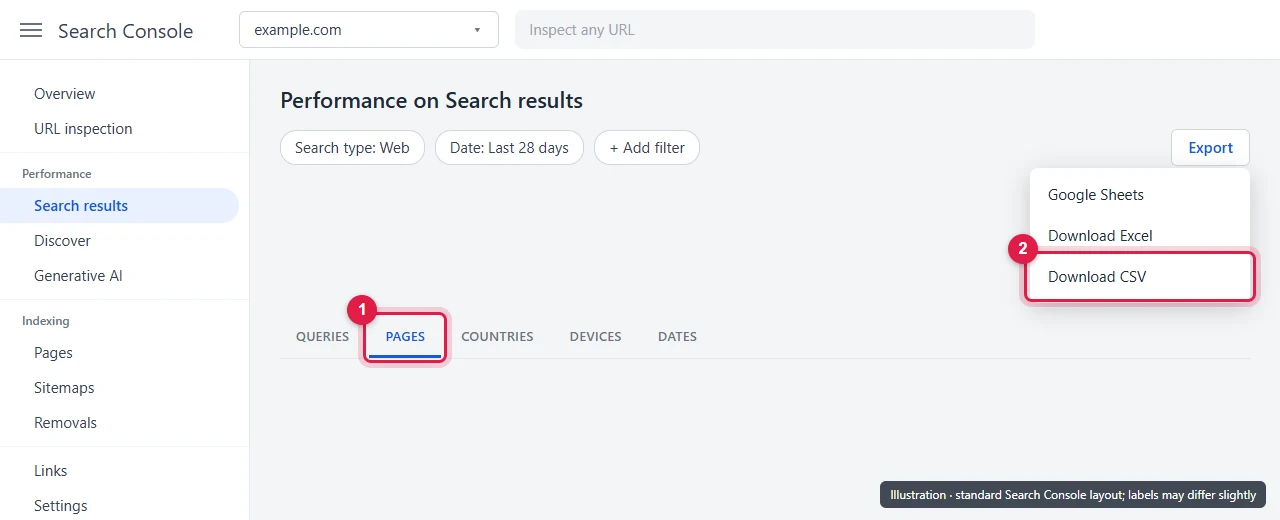
Search Console shows up to 1,000 rows in the table. For most small and mid-size sites, that covers every landing page with clicks.
Step 2: Export the GA4 Landing page report
- In GA4, open Reports → Engagement → Landing page.
- Set the same dates as your Search Console export.
- Add a filter so you only see organic Google traffic. For example, Session source / medium exactly matches
google / organic. - Click Share this report → Download File → Download CSV.
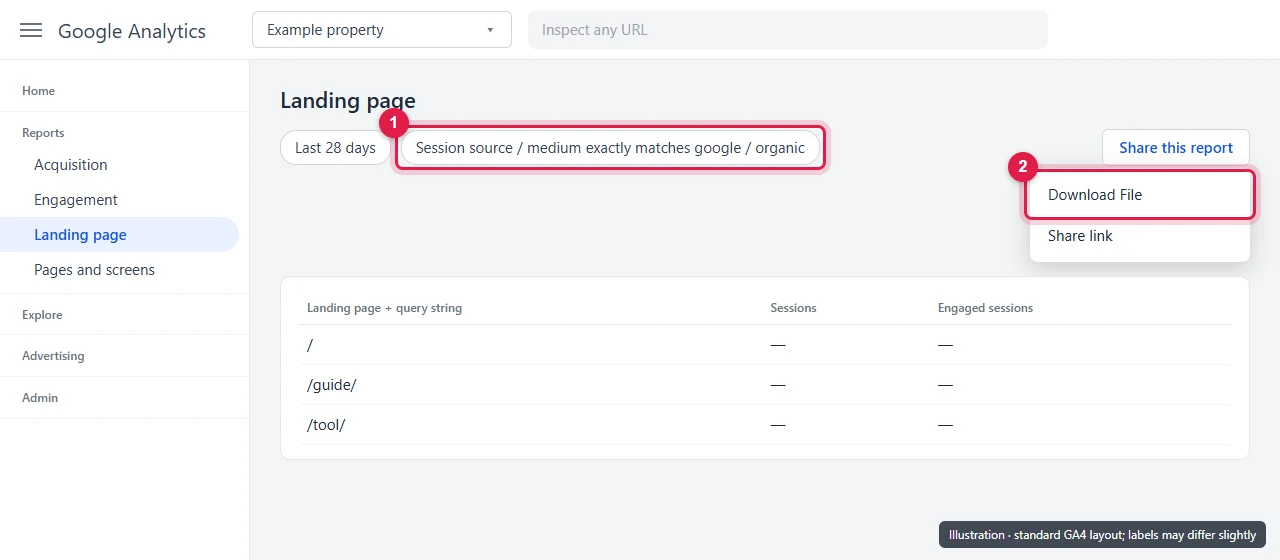
Filtering matters. Without it, GA4 includes direct, social and paid visits, and the comparison means nothing.
Step 3: Run the comparison script
Save this as compare_gsc_ga4.py. It uses only standard Python, so there’s nothing to install.
#!/usr/bin/env python3
"""Compare Search Console clicks with GA4 organic sessions, landing page by landing page."""
import argparse, csv, io, re, zipfile
from urllib.parse import urlparse


def read_rows(path):
    if path.lower().endswith(".zip"):
        with zipfile.ZipFile(path) as z:
            name = next((n for n in z.namelist() if "page" in n.lower()), z.namelist()[0])
            text = z.read(name).decode("utf-8-sig")
    else:
        with open(path, encoding="utf-8-sig") as f:
            text = f.read()
    # GA4 exports start with comment lines beginning with '#'
    lines = [l for l in text.splitlines() if l.strip() and not l.startswith("#")]
    return list(csv.DictReader(io.StringIO("\n".join(lines))))


def col(row, *words):
    for c in row:
        if any(w in c.lower() for w in words):
            return c
    raise SystemExit(f"No column matching {words}. Columns: {list(row)}")


def num(v):
    v = (v or "").replace(",", "").strip()
    return float(v) if re.fullmatch(r"-?\d+(\.\d+)?", v) else 0.0


def path_key(url):
    p = urlparse(url.strip()) if "://" in url else urlparse("https://x" + url.strip())
    path = p.path or "/"
    return path if path.endswith("/") or "." in path.rsplit("/", 1)[-1] else path + "/"


def main():
    ap = argparse.ArgumentParser()
    ap.add_argument("--gsc", required=True)
    ap.add_argument("--ga4", required=True)
    ap.add_argument("--out", default="gsc_vs_ga4.csv")
    a = ap.parse_args()

    gsc_rows, ga_rows = read_rows(a.gsc), read_rows(a.ga4)
    g_page, g_clicks = col(gsc_rows[0], "page", "url"), col(gsc_rows[0], "click")
    a_page, a_sess = col(ga_rows[0], "landing", "page"), col(ga_rows[0], "session")

    gsc, ga = {}, {}
    for r in gsc_rows:
        k = path_key(r[g_page]); gsc[k] = gsc.get(k, 0) + num(r[g_clicks])
    for r in ga_rows:
        if r[a_page].strip().lower() in ("(not set)", "total", ""):
            continue
        k = path_key(r[a_page]); ga[k] = ga.get(k, 0) + num(r[a_sess])

    out = []
    for k in sorted(set(gsc) | set(ga)):
        c, s = gsc.get(k, 0), ga.get(k, 0)
        ratio = round(s / c, 2) if c else None
        if c and not s:
            flag = "clicks but no GA4 sessions: check the tag"
        elif s and not c:
            flag = "GA4 sessions but no GSC clicks: check canonical / redirects"
        elif ratio is not None and ratio < 0.5:
            flag = "GA4 much lower: consent, tag firing, or redirects"
        elif ratio is not None and ratio > 1.5:
            flag = "GA4 much higher: non-canonical URLs or other Google sources"
        else:
            flag = ""
        out.append({"landing_page": k, "gsc_clicks": int(c), "ga4_sessions": int(s),
                    "sessions_per_click": ratio if ratio is not None else "", "check": flag})
    out.sort(key=lambda r: -(r["gsc_clicks"] + r["ga4_sessions"]))
    with open(a.out, "w", newline="", encoding="utf-8") as f:
        w = csv.DictWriter(f, fieldnames=list(out[0])); w.writeheader(); w.writerows(out)
    print(f"Wrote {len(out)} landing pages to {a.out} ({sum(1 for r in out if r['check'])} flagged)")


if __name__ == "__main__":
    main()
Run it with your two files:
python compare_gsc_ga4.py --gsc Pages.csv --ga4 ga4-landing-pages.csv
What the script handles for you:
- GA4’s comment lines. GA4 CSV files start with lines beginning with
#. The script skips them. - Full URLs vs paths. Search Console gives
https://example.com/guide/, GA4 gives/guide/. Both become/guide/. - Query strings.
/guide/?utm_source=newsletterand/guideare merged into/guide/, the way Search Console groups them under the canonical URL. - Numbers with commas, like
"1,200", and the(not set)row in GA4.
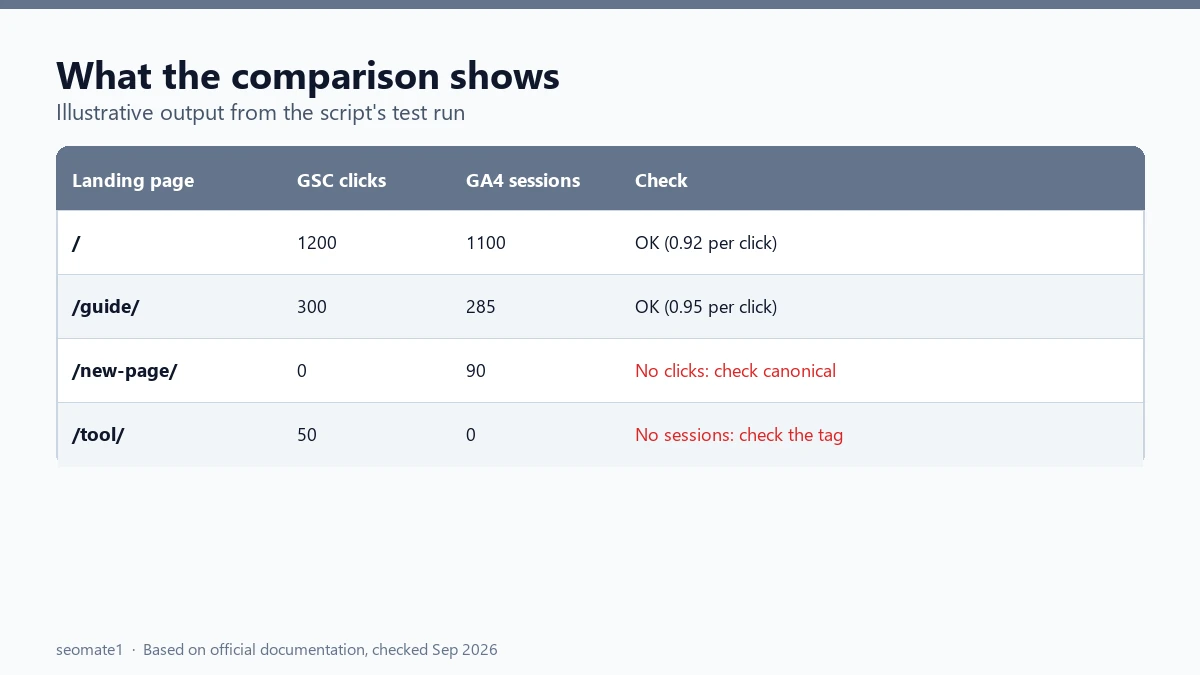
We tested it on 24 September 2026 with sample files in the same layout as real exports. It merged the query-string rows correctly, skipped the GA4 header lines, and flagged the three pages we set up with problems. It hasn’t been run on every export language. If a column isn’t found, the error message lists the column names it saw.
Step 4: Read the flags and fix what’s broken
The script adds a check column. Here’s what each flag usually means and what to look at:
“Clicks but no GA4 sessions”
Search Console says people arrived, but GA4 saw nobody. The most common causes:
- The GA4 tag is missing on that page or template. Check with Tag Assistant or your browser’s network tab.
- A redirect drops the visitor before the tag fires. Common after a site move or URL change.
- It’s a PDF or other file. GA4 doesn’t track those by default.
“GA4 sessions but no Search Console clicks”
GA4 saw organic Google visits to a URL that Search Console doesn’t list. Usually:
- The URL isn’t the canonical. Search Console reports clicks under the canonical URL, so they’re sitting on a different row. Check which URL Google chose with the URL Inspection tool.
- The page redirects. GA4 records the final URL, Search Console the one in the results.
“GA4 much lower” (under half)
A big gap on an otherwise normal page often means consent banners are blocking GA4 for many visitors, or the tag fires late on slow pages. Compare the same page’s ratio over several months. A sudden drop points to a recent change.
“GA4 much higher” (over 1.5×)
Other Google traffic, such as Discover or Google News, may be tagged google / organic in GA4 while Search Console’s Web report doesn’t include it. Check the Discover report in Search Console for those pages.
Common mistakes
- Different date ranges. Even one day off, plus the Pacific Time difference, changes small pages a lot.
- No organic filter in GA4. You end up comparing all traffic with Search clicks.
- Comparing single days. Use at least 28 days. Daily numbers are too noisy.
- Expecting a perfect match. A consistent 5–15% gap is normal. Look for pages that break the pattern.
FAQ
Can I just link Search Console to GA4 instead?
Yes. Linking adds Search Console reports inside GA4, which is handy for quick checks. It still doesn’t show Search Console clicks and GA4 sessions side by side per page with a flag for gaps, which is what this comparison is for.
Why does my homepage have more GA4 sessions than clicks?
Brand searches, Discover visits, and people who land on a non-canonical version of the homepage can all push GA4 higher. It’s common on homepages and rarely a problem.
How often should I run this?
Monthly is enough for most sites. Run it straight away after a redesign, a tag change, or a site move. Those are the moments tracking tends to break.
Does AI Mode traffic show up in both?
AI Mode clicks are part of Search Console’s Web search type. In GA4 they arrive as normal Google organic visits. More on that in how AI Mode clicks are counted.
Last checked against Google’s documentation on 24 September 2026. Script tested with sample export files on 24 September 2026.
Make it easier to find our SEO, AI search and digital marketing coverage in Google.

Nadir Yaqoob
Nadir Yaqoob is the founder and editor of SEOMate1. He has more than 10 years of experience in SEO, and today focuses on AI search: helping SaaS and e-commerce brands stay visible in Google's AI Overviews and AI Mode, and turn search traffic into leads. He's based in Lahore, Pakistan.