Instagram auto followers tools promise to grow your account without effort. We opened every one that ranks on Google’s first page. Some are really hashtag apps or ad-funded games. Others are bots that follow and unfollow people from your account. Instagram’s Terms ban automated access without permission. It has removed follows made through third-party apps since 2018.
Here’s what we found, tool by tool, and what to do instead.
Which one are you?
Three very different people search for “Instagram auto followers”. Jump to your part:
| You are… | What you need | Go to |
|---|---|---|
| Looking for an app to get followers automatically | An honest look at what these tools do | What we found |
| Worried because your account follows people you never followed | A security fix, fast | Your account is following people by itself |
| Wondering if auto followers are safe or allowed | Instagram’s actual rules | What Instagram says |
What we found on page one
On 28 September 2026 we searched “instagram auto followers” and four close variations on Google (US). Then we opened every tool that ranked. This is SEOMate1 observed: what the listings and websites showed on that day.
| Tool | What the listing says | What we actually found | Asks for your password? |
|---|---|---|---|
| Followers Up for Instagram (Android) | A hashtag app | Banner says “Get Real Followers & Likes”. Top reviews describe other apps | No sign of it on the listing |
| TopFollow-Tags (Android) | “Just use our hashtags” | Reviews talk about logging in, a “Wrong Password” error, and spending coins to order followers | Reviews say yes |
| Get Followers & Likes For Ins (Android) | Followers and likes | A card-flip game. You watch ads to play more, and you win hashtags | Says no |
| Followers Pro (Chrome) | Auto follow and unfollow | A real follow/unfollow bot in your browser | No, uses your logged-in session |
| AutoFollow (Chrome) | “Grow your followers on autopilot” | Up to 200 follows and 200 unfollows a day on the paid plan | No, uses your logged-in session |
| Nitreo (web service) | Organic growth | Follows accounts, likes and views stories “on your behalf” | You connect your account |
Two things stand out. First, none of these tools gives you followers directly. They either make your account follow and like other people, hoping some follow back, or they hand you hashtags. Second, the store listings and the reviews often don’t match.
Followers Up for Instagram: 5 million downloads, reviews for other apps
Followers Up has a 4.7 rating from 698K reviews and more than 5 million downloads. Its description says it’s a hashtag app: pick a category, copy the tags. The screenshot banner says something bigger: “Get Real Followers & Likes to Be Famous”.
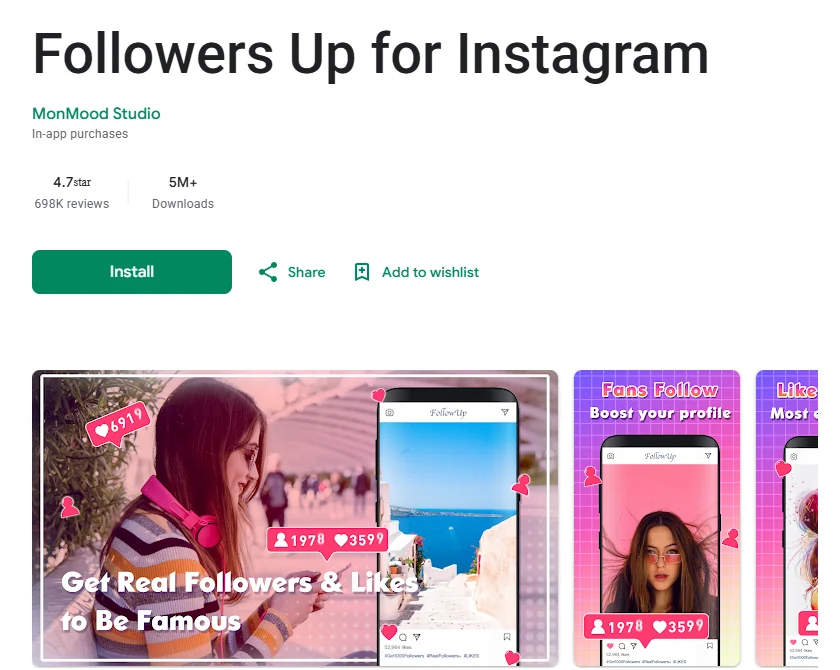
The reviews are stranger. When we checked, the top “helpful” reviews didn’t describe a hashtag app at all. Two near-identical 5-star reviews praised “the best learning app” and complained about paying for “unlimited lessons”. Another described “this budget-tracking app”. The app itself was last updated on 6 August 2024.
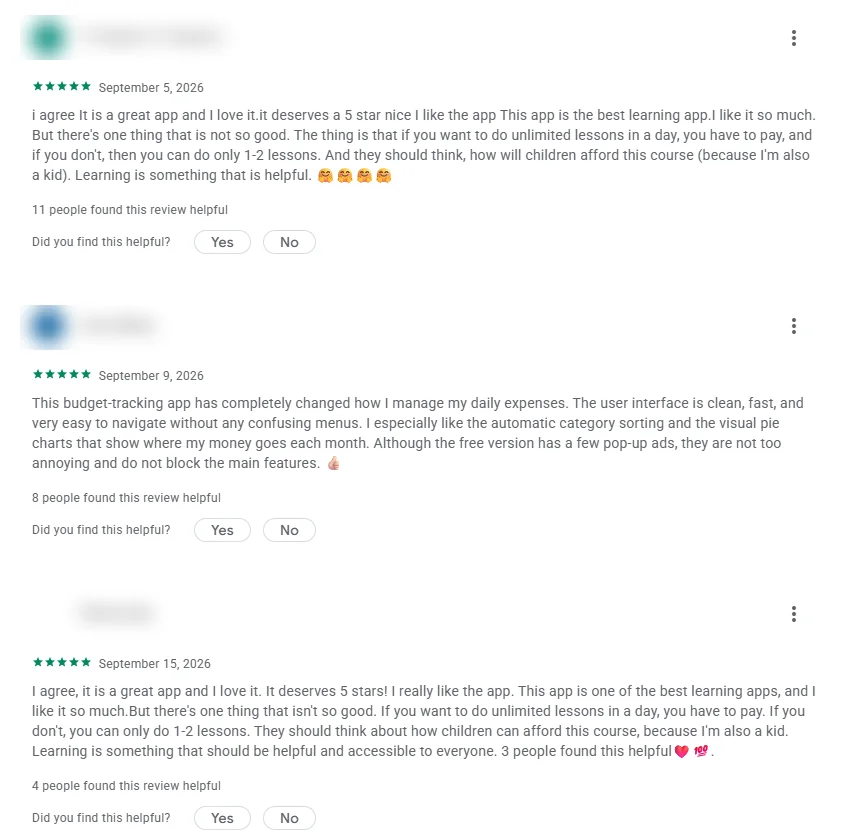
We can’t say how those reviews got there. But a 4.7 rating built partly on reviews for other apps tells you very little about this one.
TopFollow-Tags: the listing says hashtags, the reviews say coins
TopFollow has over 10 million downloads and a 3.9 rating. The listing is one line long: “Just use our hashtags on your photos.”
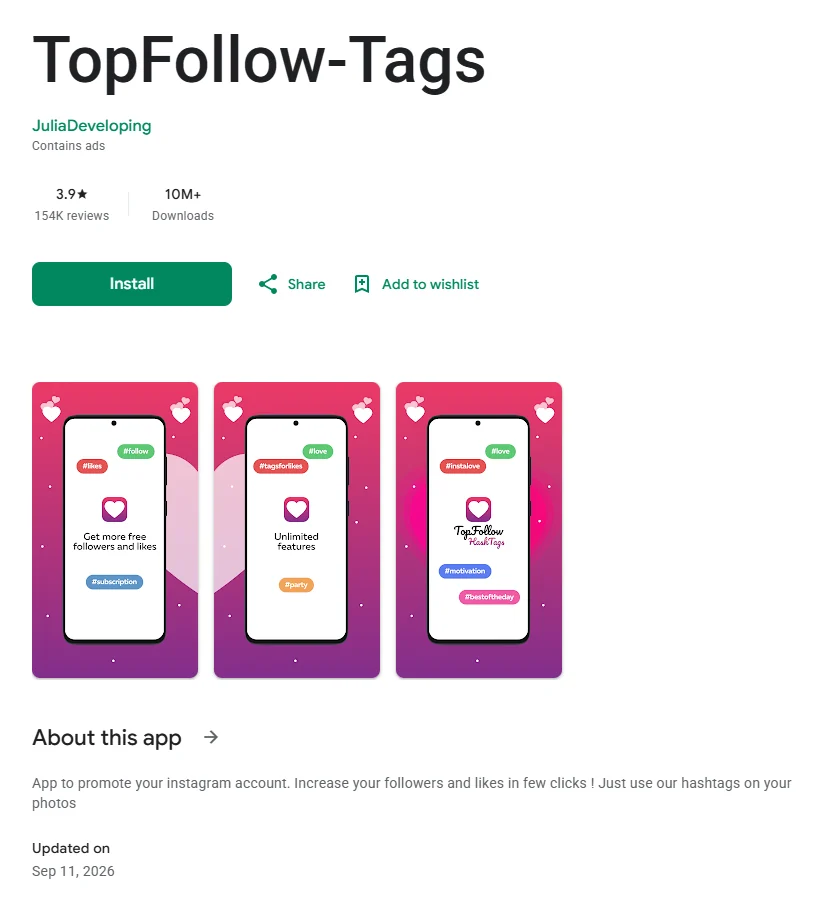
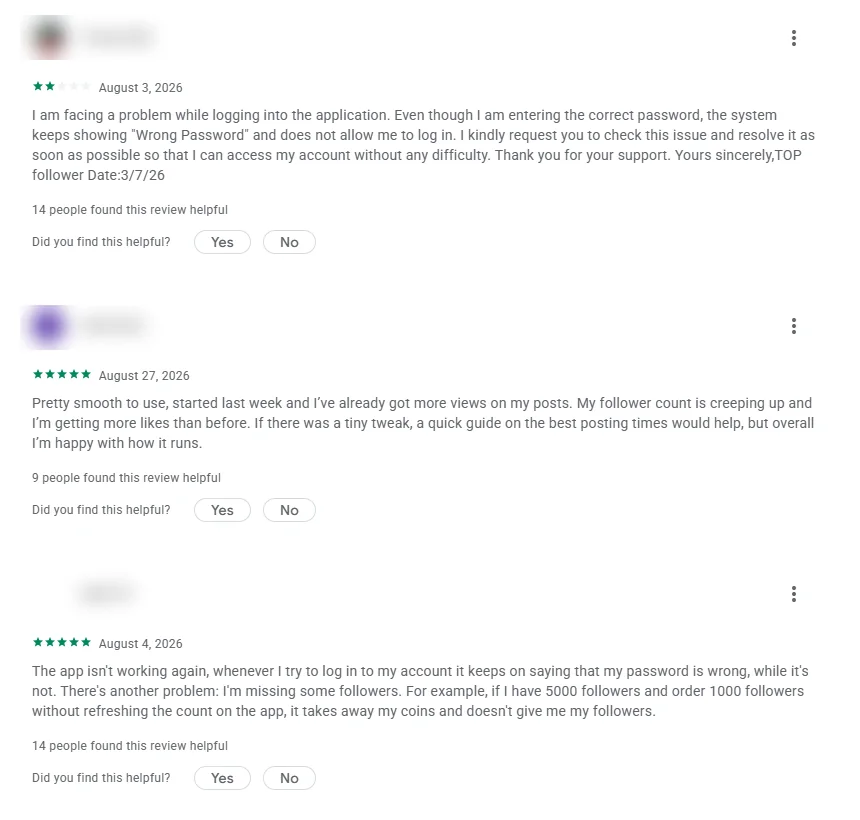
The reviews tell a different story. One user can’t log in because the app keeps saying “Wrong Password”. Another writes that they “order 1000 followers” and the app “takes away my coins and doesn’t give me my followers”. Hashtag apps don’t need your password, and they don’t sell followers for coins.
The Play Store’s data safety section also says the app may share device IDs with third parties.
Get Followers & Likes For Ins: a game with hashtags as prizes
This one is at least upfront. Its description says you “flip the cards” to win points, “watch ads to play more times”, and get “the best hashtag combinations” as a reward. It says it’s “NOT an exchange program” and never asks for your password. So it isn’t an auto follower tool. It’s an ad-supported game that ranks for the keyword.
Followers Pro and AutoFollow: real bots, running as you
These two Chrome extensions do what the keyword suggests. They follow and unfollow accounts automatically, from your own logged-in Instagram session.
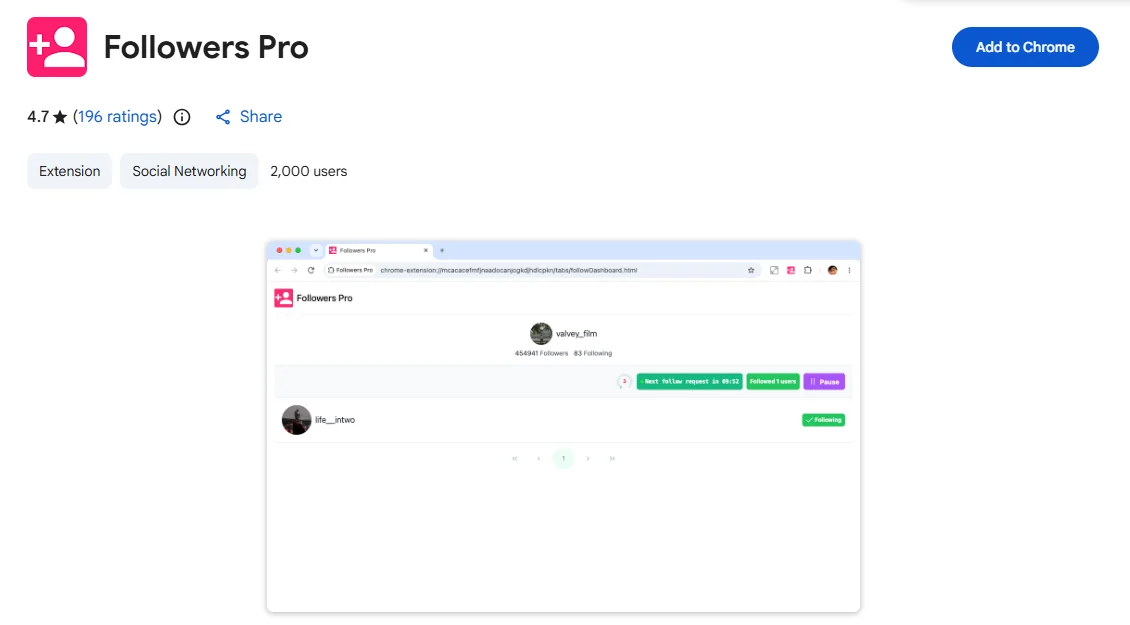
AutoFollow’s site is unusually open about the numbers. The free plan allows 7 follows, 7 unfollows and 7 likes a day. The paid plan costs €7.99 a month and allows up to 200 follows, 200 unfollows and 100 likes a day. It adds random 4–15 second pauses so the activity “looks like a real person browsing”.
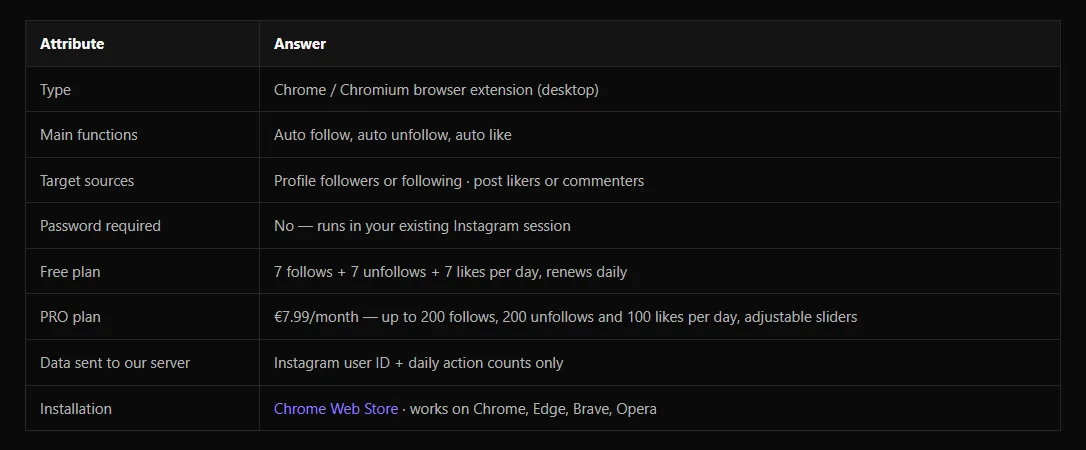
That last line is the key point. The tool is built to look human because Instagram tries to spot automation. The 200-a-day ceiling is the vendor’s choice. Instagram doesn’t publish a “safe” number.
Nitreo: a done-for-you service
Nitreo isn’t an app you run yourself. You connect your Instagram account and choose hashtags, competitor accounts and locations. Nitreo then “follows relevant accounts, likes comments, views profiles and stories on your behalf”. Its domain dates from November 2019.
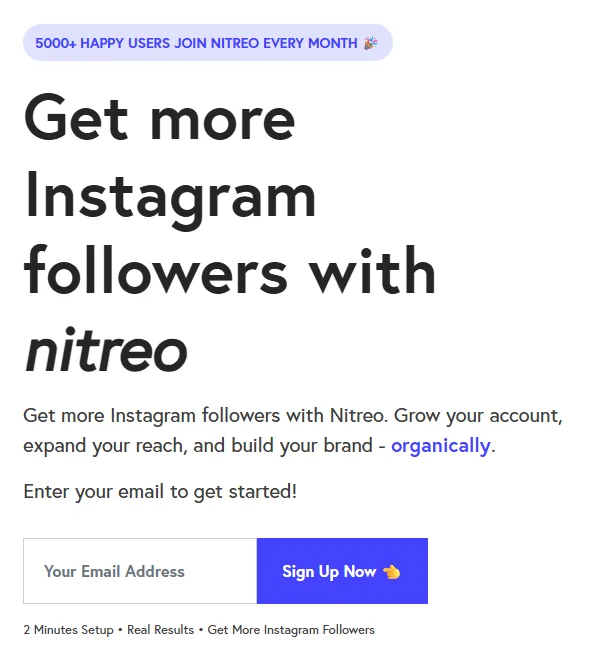
The word “organically” does a lot of work here. The people who follow you back are real. But the following, liking and story-viewing that attracts them is done by software, not by you.
Tools we couldn’t assess
PhantomBuster and Apify both rank with Instagram auto-follow automations. ManyChat ranks with a “follow to DM” feature. Their pages didn’t load properly in our browser that day, so we’ve left them out rather than guess.
What Instagram actually says
Here’s the rulebook, quoted directly. We haven’t paraphrased any of it.
- Terms of Use: you can’t access or collect information “in an automated way without our express permission”. (Instagram Terms of Use)
- Community Guidelines: “Help us stay spam-free by not artificially collecting likes, followers, or shares”. (Community Guidelines)
- The 2018 crackdown: “Starting today, we will begin removing inauthentic likes, follows and comments from accounts that use third-party apps to boost their popularity.” Instagram said affected accounts would get an in-app message and be asked to change their password. (Instagram announcement, 19 Nov 2018)
- Account restrictions: Instagram’s help centre says accounts can be restricted and “flagged for further review” when it detects automated access that breaks its terms.
There’s also a legal angle in the US. In August 2024 the FTC announced a rule that “prohibits anyone from selling or buying fake indicators of social media influence, such as followers or views generated by a bot”. It applies in commercial settings, for example a business inflating its numbers. (FTC announcement)
The maths nobody shows you
Say a tool does work, and you gain lots of followers who never really look at your posts. Your follower count goes up, but your engagement rate goes down. That’s the number brands and collaborators actually check.
This is an illustrative example, simple arithmetic rather than measured data:
| Before | After adding 8,000 inactive followers | |
|---|---|---|
| Followers | 2,000 | 10,000 |
| Likes and comments per post | 100 | 100 |
| Engagement rate | 5% | 1% |
Follow/unfollow bots have their own cost. When you follow 200 people a day and unfollow them later, the people who follow back often notice you’ve left, and many of them unfollow too. You spend your account’s reputation to buy a number.
If you want to see where real followers come from, Instagram Insights is still the right tool for that. Search Console only covers the Google side.
Your account is following people by itself
If your account is following accounts you never chose, treat it as a security problem. Instagram says auto-following “can also happen if third-party apps have access or the account is compromised”. Many “free followers” apps that ask for your login are exactly that kind of access.

Do these steps in order:
- Change your password. This cuts off any app or person using your old one. It’s also the step Instagram asked affected users to take in 2018.
- Check where you’re logged in. Go to Accounts Center → Password and security → Where you’re logged in. Log out any device you don’t recognise.
- Remove third-party access. In your settings, open the apps and websites section and remove anything you don’t use or trust.
- Turn on two-factor authentication. It’s in the same Password and security area.
- Unfollow the accounts the app followed for you.
If the problem is the other way round, and spam accounts keep following you, Instagram has a setting for that. Go to your profile, tap Menu → Follow and invite friends, and make sure Flag for review is on. Suspicious new followers then go into a separate list you can remove in one go.
Automation Instagram does allow
“Automation” isn’t all banned. The line is between tools Instagram provides or permits through its official systems, and tools that pretend to be you.
- Scheduling posts. You can schedule posts and reels inside Instagram itself, or through Meta Business Suite.
- Automatic replies to messages. Business tools built on Meta’s official messaging systems can send replies, for example when someone comments a keyword. Check that any tool you use says it’s an official Meta partner, and never give it your password.
- Reports. Instagram Insights shows which posts bring followers, so you can make more of what works.
- Getting found on Google. Posts that answer real searches keep bringing new people for months, with no bot involved. Search Console can now track your social accounts as platform properties. For example, you can compare YouTube Shorts with long videos in Google Search to see which format people actually find. A Search Profile badge on your website also lets visitors follow you from Google.
None of these will add 1,000 followers in a week. But none of them will get your follows removed or your account flagged either.
Our verdict
| If you want… | Our advice |
|---|---|
| Followers without effort | No tool on page one does this. Most just make your account follow other people |
| A “free followers” app that wants your login | Don’t. Password-sharing is how accounts end up following strangers |
| A follow/unfollow bot | It breaks Instagram’s Terms. The follows it brings rarely last |
| Steady growth | Post what Insights shows works, schedule it natively, and reply to people yourself |
FAQ
Is there a free Instagram auto follow bot?
Yes, several Chrome extensions have free plans. AutoFollow’s free plan allows 7 follows a day, for example. But they all automate your account in a way Instagram’s Terms don’t permit.
Is it illegal to bot followers?
In most places it isn’t a crime for an individual. It is against Instagram’s Terms. In the US, the FTC’s 2024 rule bans buying or selling fake social media followers in commercial settings.
How do I stop auto followers on Instagram?
If spam accounts are following you, turn on Flag for review under Follow and invite friends. If your own account is following people, change your password, check Where you’re logged in, and remove third-party apps.
Why do apps ask for my Instagram password?
Because they need to act as you, following, liking or viewing from your account. Instagram’s own advice to people who used such apps was to change their password to cut off access.
Last checked: 28 September 2026. We re-check the tools on Google’s first page every three months and update this page.
Make it easier to find our SEO, AI search and digital marketing coverage in Google.

Nadir Yaqoob
Nadir Yaqoob is the founder and editor of SEOMate1. He has more than 10 years of experience in SEO, and today focuses on AI search: helping SaaS and e-commerce brands stay visible in Google's AI Overviews and AI Mode, and turn search traffic into leads. He's based in Lahore, Pakistan.