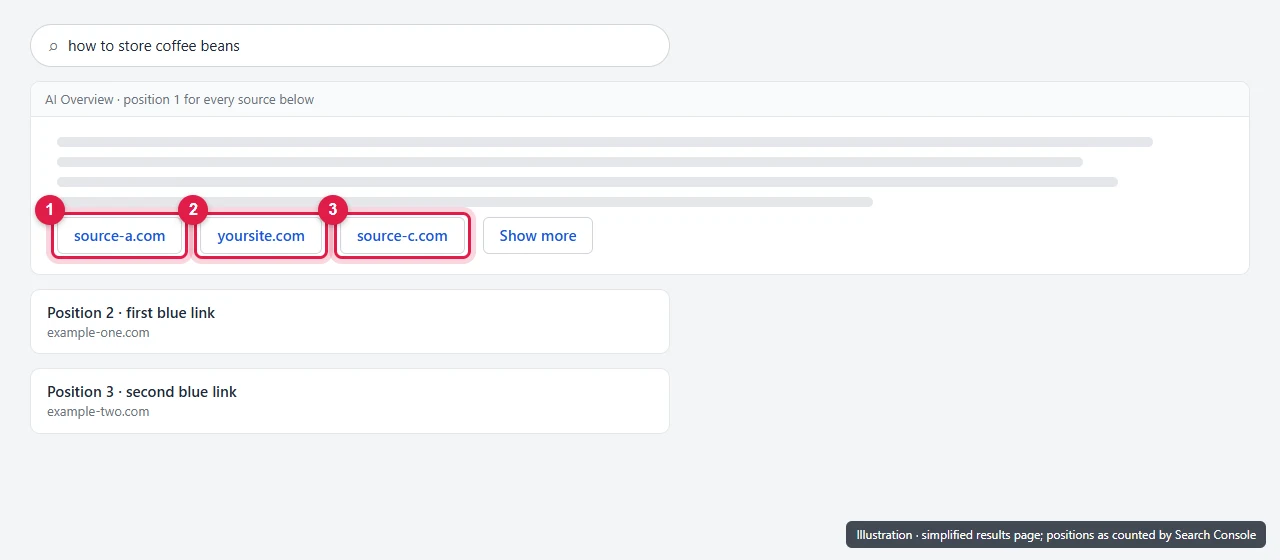
In Search Console, an AI Overview counts as one position on the results page, and every link inside it gets that same position. So if the AI Overview is the first thing on the page, every site it links to is recorded at position 1, whether its link is the first source or the fifth. If the AI Overview sits lower down, all its links share that lower position.
This is why pages cited in AI Overviews can show a very good average position but a low click-through rate.
The rule comes from Google’s help page on how impressions, position and clicks are counted. Below are worked examples, what it does to your numbers, and how to read them.
The rule, in Google’s words
For AI Overviews, Google says:
- Position: “An AI Overview occupies a single position in search results, and all links in the AI Overview are assigned that same position.”
- Click: “Clicking a link to an external page in the AI Overview counts as a click.”
- Impression: “Standard impression rules apply.”
And for position in general, Search Console shows “the topmost position” your site held, averaged across all searches. Positions are counted from top to bottom on the main column of the page, then top to bottom on the side column.
Worked examples
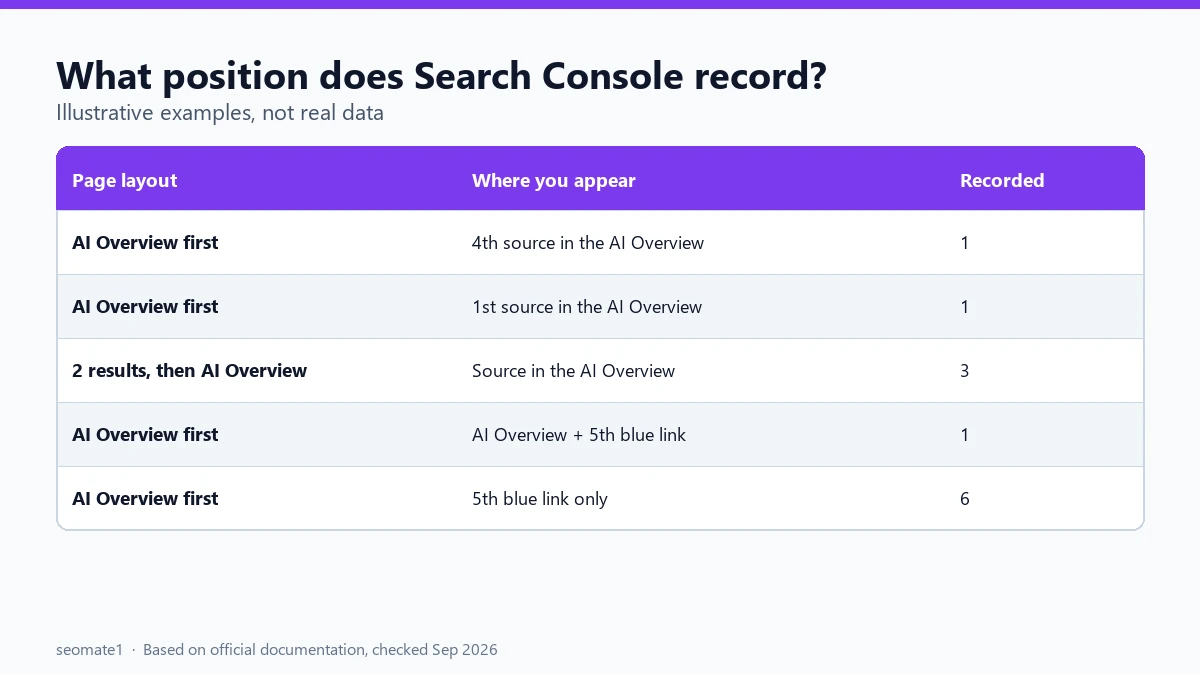
These examples use made-up pages to show how the rule plays out. They’re illustrations, not real data.
| What’s on the page | Where your site appears | Position Search Console records for you |
|---|---|---|
| AI Overview at the top, then 10 results | 4th source link inside the AI Overview | 1 |
| AI Overview at the top | 1st source link inside the AI Overview | 1, the same as being 4th |
| Two results, then the AI Overview | Inside the AI Overview | 3 |
| AI Overview at the top | Inside the AI Overview and as the 5th blue link | 1, because the topmost position counts |
| AI Overview at the top | Only as the 5th blue link | 6 (5th blue link below the AI Overview) |
Two things stand out:
- Your order inside the AI Overview doesn’t matter for position. Being the first source or the last gets the same number.
- Being cited can improve your reported position for a query where your blue link ranks lower. The AI Overview’s position replaces it, because Search Console records your topmost spot.
What about links you have to click to see?
AI Overview source links aren’t always visible straight away. Some sit in a scrolling row, or appear only after the reader clicks “Show more”.
Google’s general impression rule covers this. An impression counts when an item appears on the current page, “whether or not the item is scrolled into view”. But inside carousels and expanding sections, “the item must typically be scrolled into view within the carousel, or expanded by a click, to register an impression.”
In practice, this means a source link hidden inside an unexpanded AI Overview may get no impression at all for that search. If there’s no impression, no position is recorded for it either.
Why your average position can look better than your traffic
Put these rules together and you get a common pattern in Search Console:
- Average position close to 1, because the AI Overview sits at the top.
- Low CTR, because many readers get their answer from the AI Overview and never click a source. Also, a source shown fourth gets the same position as one shown first, but it’s less likely to be clicked.
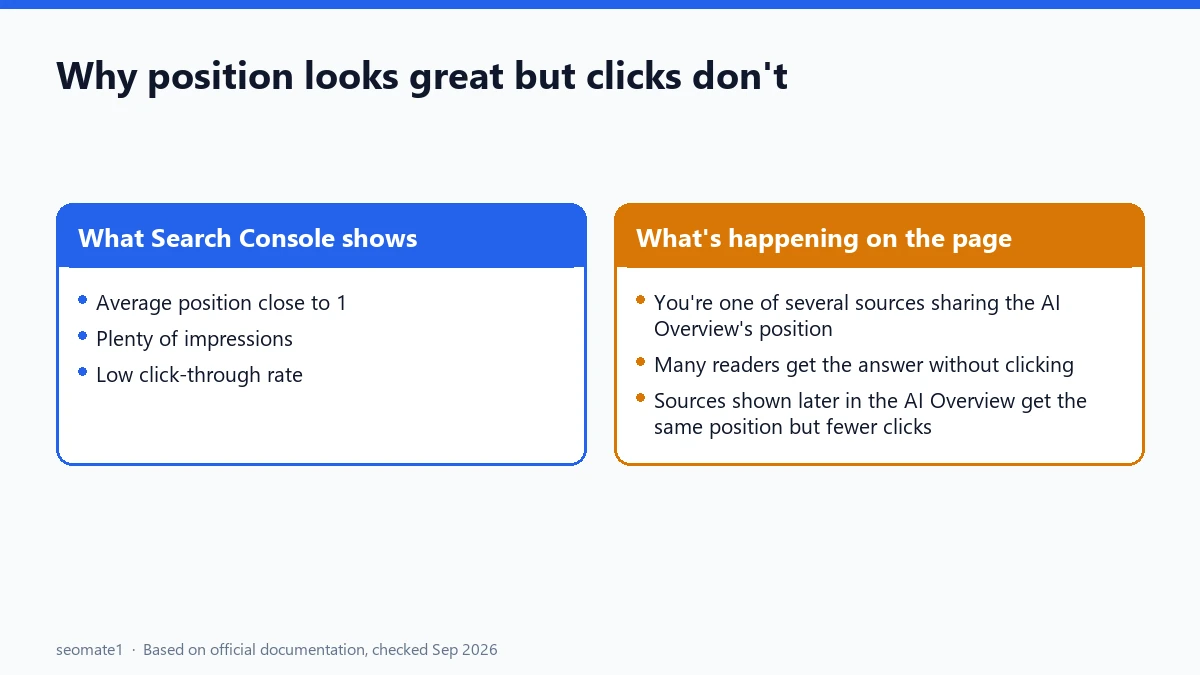
So a page with position 1.3 and a CTR of 1% isn’t necessarily broken. It may be cited in AI Overviews for that query rather than ranking first as a normal result.
How to tell if AI Overviews are behind your numbers
Search Console doesn’t label which queries showed an AI Overview. When we checked Google’s help pages in September 2026, none described a filter for it in the Performance report. You can still narrow it down:
- Open the generative AI report. It shows impressions from AI Overviews and AI Mode by page. If a page appears there, it’s being shown in AI features.
- Compare with the Performance report. For the same page and date range, look at queries with a very good average position but a low CTR.
- Check the query yourself. Search it in a private window. You may or may not see an AI Overview, since they don’t appear for every person or every search. Treat this as a hint, not proof.
For a step-by-step way to line the two reports up, see how to export the generative AI report and join it with your click data.
AI Overviews vs AI Mode
The two features are counted differently, which matters if you compare them:
| AI Overview | AI Mode | |
|---|---|---|
| Position | One position for the whole AI Overview, shared by all its links | Same method as a normal results page |
| Follow-up questions | Not applicable | Each follow-up counts as a new query |
| Click | A click on an external link | A click on an external link |
More detail: how AI Mode impressions, clicks and position are counted.
Common misunderstandings
- “We’re position 1, so we rank first.” For queries with an AI Overview, you may be one of several cited sources sharing position 1.
- “Our position improved, so our SEO worked.” Being newly cited in an AI Overview can lift reported position without changing your blue-link ranking.
- “Position 1 should mean lots of clicks.” Not when the answer is right there in the AI Overview.
FAQ
Does being cited in an AI Overview count as an impression?
Usually yes. The standard impression rules apply. The exception is a source link the reader has to scroll to or expand, which may not count until it’s shown.
Can I see AI Overview clicks separately?
No. Clicks from AI Overviews are counted in the main Performance report under the Web search type, mixed with other results. The generative AI report shows impressions only.
Can I stop my site appearing in AI Overviews?
Yes, with the Search generative AI control in Search Console, or nosnippet on single pages. Excluding has side effects, so read what Include and Exclude change first.
Last checked against Google’s documentation on 24 September 2026.
Make it easier to find our SEO, AI search and digital marketing coverage in Google.

Nadir Yaqoob
Nadir Yaqoob is the founder and editor of SEOMate1. He has more than 10 years of experience in SEO, and today focuses on AI search: helping SaaS and e-commerce brands stay visible in Google's AI Overviews and AI Mode, and turn search traffic into leads. He's based in Lahore, Pakistan.