
Discovered – currently not indexed means Google knows a URL exists but hasn’t crawled it yet. Google says it rescheduled the crawl because crawling then “was expected to overload the site”, so the “Last crawled” date is empty. The usual causes are a struggling server, too many low-value URLs, or weak internal links.
A few URLs in this state is normal on almost any site. It only needs action when important pages sit there for weeks, or when a large share of your site is stuck.
What Google says, and what it doesn’t
It helps to separate what Google has documented from what people assume.
| What we know | |
|---|---|
| Google documented | The page was found but not crawled. Google rescheduled the crawl because it expected to overload the site. The last crawl date is empty. (Page indexing report help) |
| Google documented | Crawling depends on a site’s crawl capacity limit (how much your server can take) and crawl demand (how much Google wants to crawl). (Crawl budget guide) |
| Google documented | Crawl demand for Googlebot depends on “a site’s size, update frequency, page quality, and relevance, compared to other sites”. |
| Not confirmed | Any fixed timeline. Google doesn’t say how long a URL can stay in this state. |
| Not confirmed | That this status is a penalty. Nothing in Google’s documentation describes it that way. |
Discovered vs crawled: where your page is stuck
Every URL goes through the same stages. “Discovered” is the earliest one where Search Console reports a problem.
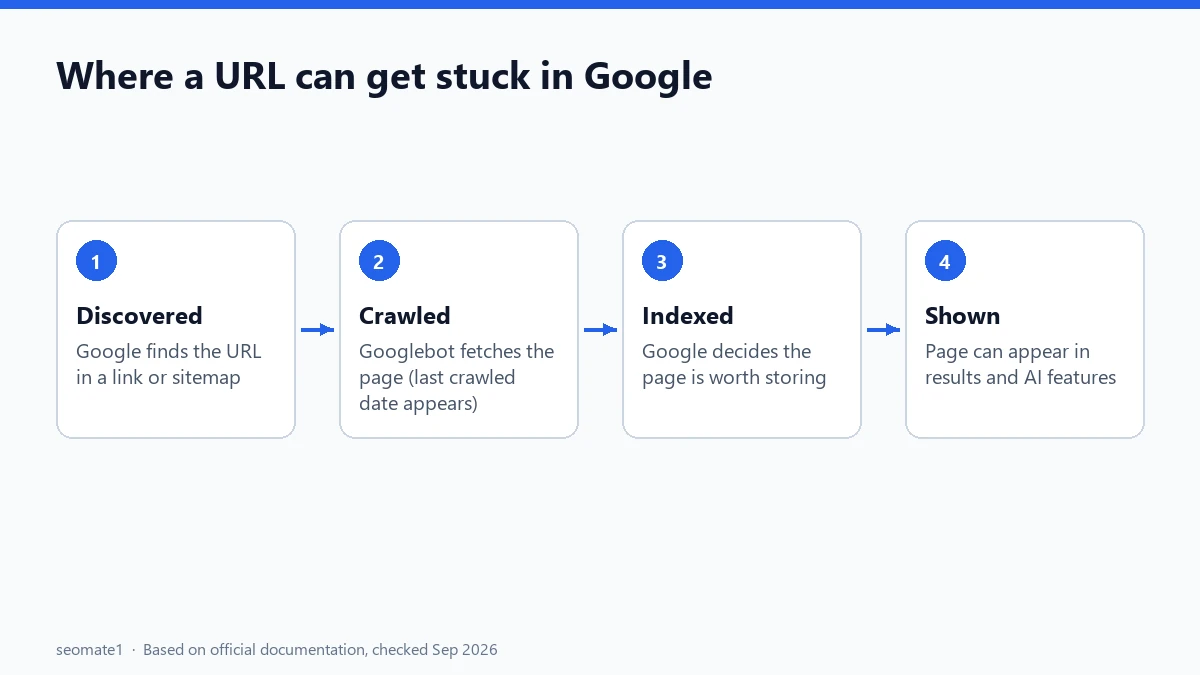
- Discovered – currently not indexed: Google has the URL in its queue, from a link or your sitemap, but hasn’t fetched the page.
- Crawled – currently not indexed: Google fetched the page, then decided not to index it for now. That’s a different problem with different fixes. Here’s why validation for that status often gets stuck.
The difference matters. With “Discovered”, Google hasn’t even looked at your content yet, so rewriting the text won’t help until the page gets crawled.
Is it actually a problem for your site?
Often it isn’t. Google’s help page asks, “Is it OK if a page isn’t indexed?” and answers, “Absolutely.”
Google’s crawl budget guide is written for:
- large sites (1 million+ unique pages) with content that changes about weekly
- medium or larger sites (10,000+ unique pages) with content that changes daily
- sites with “a large portion of their total URLs classified by Search Console as Discovered – currently not indexed”
For everyone else, the same guide says keeping your sitemap up to date and checking the Page indexing report regularly “is adequate”.
So here’s a simple rule of thumb, which is our reading rather than a Google number:
- A handful of low-value URLs (tags, filters, old test pages): leave them.
- New articles that have been stuck for more than 2–3 weeks: diagnose.
- A large share of your site: treat it as a site-wide crawling problem.
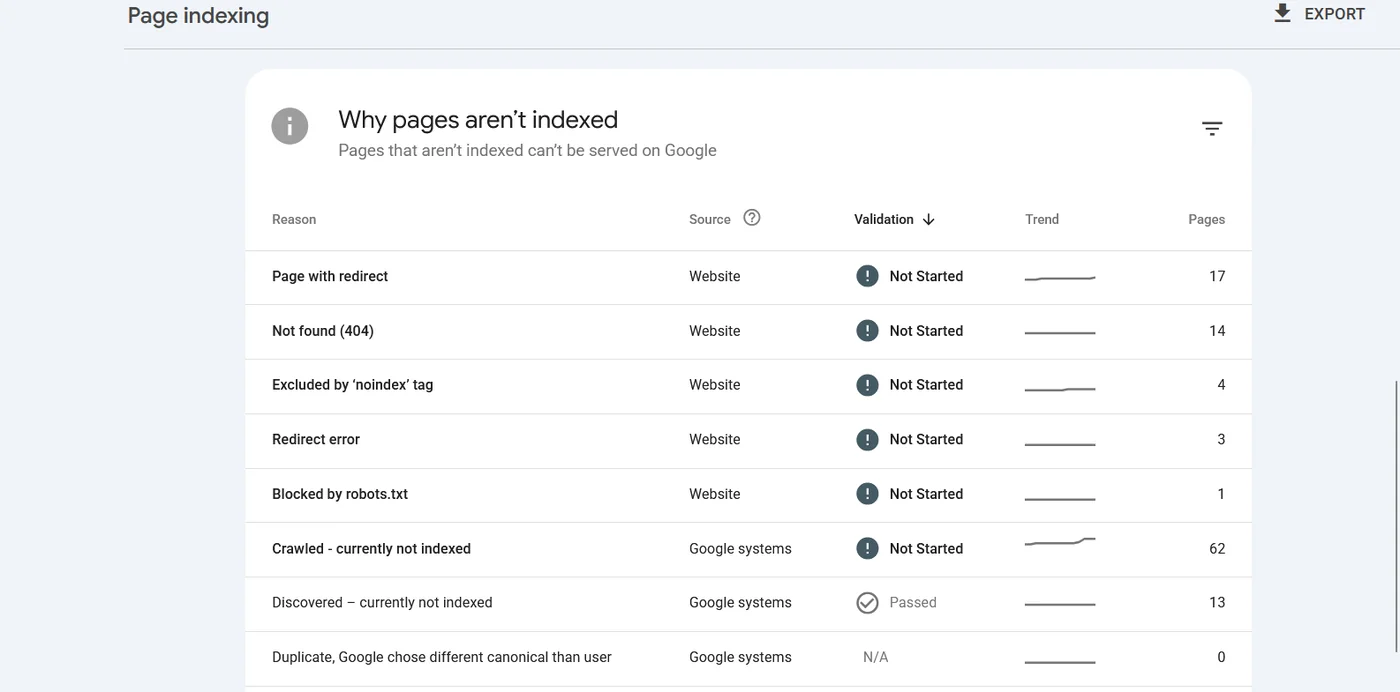
Here’s a real example from one of our client sites (SEOMate1 observed). The report shows 13 URLs under Discovered – currently not indexed, but 62 under Crawled – currently not indexed, and that line is rising. On this site, Discovered isn’t the main job. The bigger win is making the crawled pages worth indexing.
Five causes, and how to tell which one you have
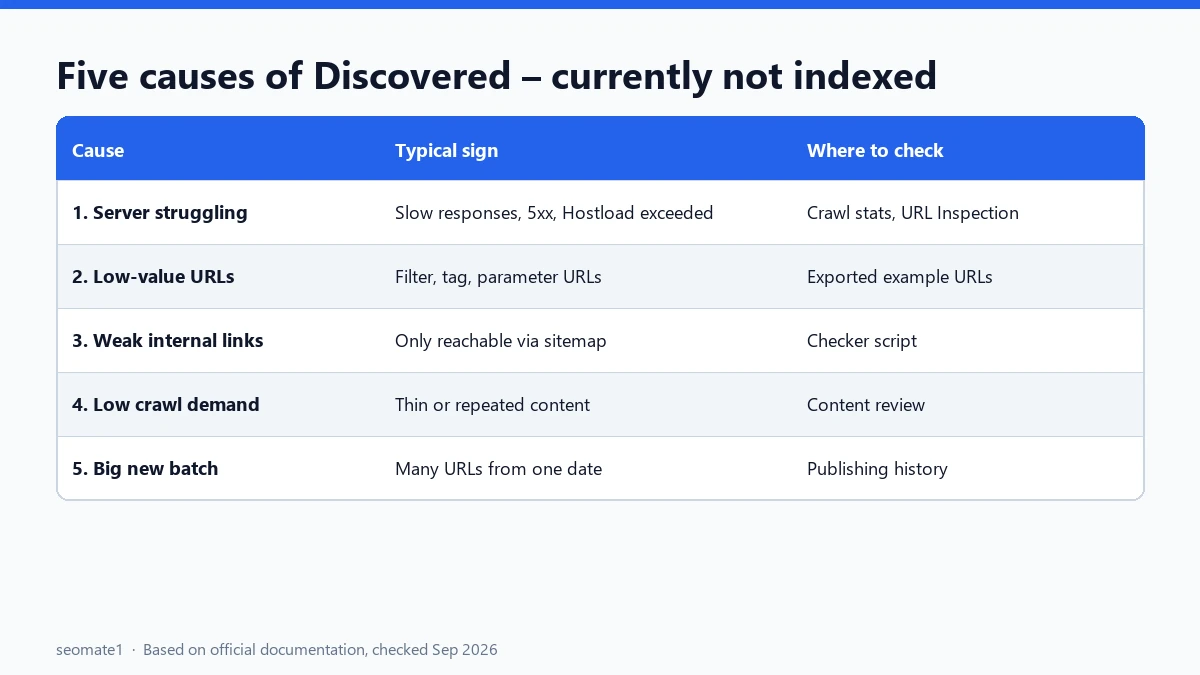
| Cause | Typical sign | Where to check |
|---|---|---|
| 1. Your server is struggling | Slow responses, 5xx errors, “Hostload exceeded” | Crawl Stats report, URL Inspection |
| 2. Too many low-value URLs | Thousands of parameter, filter or tag URLs | Page indexing report example URLs |
| 3. Weak internal linking | Page only reachable through the sitemap | Our checker script, site structure |
| 4. Low crawl demand | New or thin site, little unique content | Overall content quality |
| 5. A big batch of new pages | You published or migrated many URLs at once | Your publishing history |
1. Your server is struggling
Google says it calculates a crawl capacity limit so it can “crawl your site without overwhelming your servers”. If your server slows down or returns errors, that limit drops and Google crawls less. The guide specifically mentions “Hostload exceeded” in the URL Inspection tool as a sign your server capacity is the bottleneck.
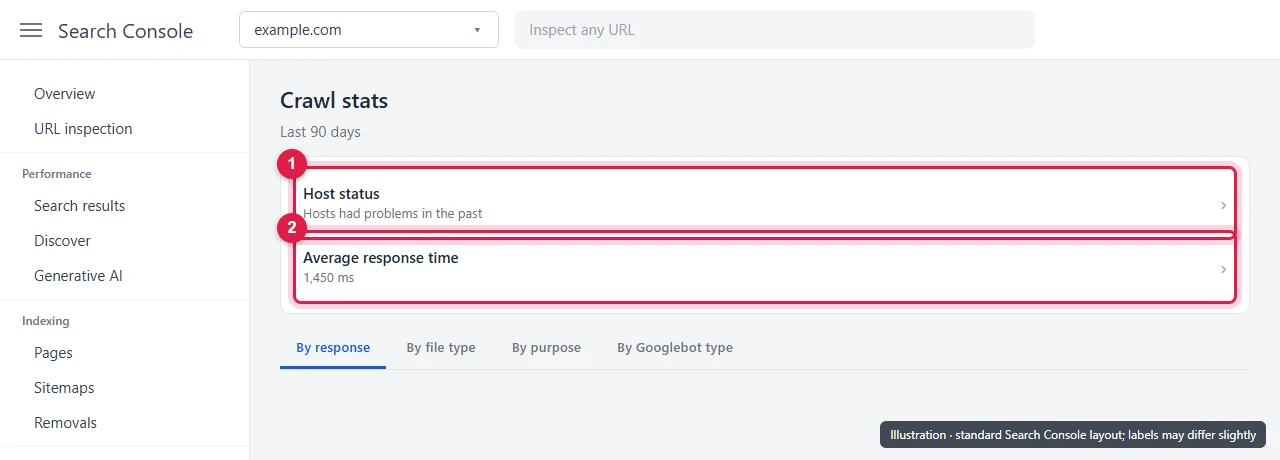
Check: open Settings → Crawl stats in Search Console and look at Host status and Average response time. Google flags availability problems from the last 90 days there.
2. Too many low-value URLs
Google calls this “perceived inventory”. If many of your URLs are duplicates, filters or pages you don’t care about, Google wastes time on them, and its crawlers “might not explore the rest of your site”.
Check: export the example URLs from the report and look for patterns: ?sort=, ?color=, /tag/, /page/7/, session IDs, calendar pages. If most stuck URLs share a pattern, that’s your answer.
3. Weak internal linking
Google’s help page says a page “must be linked from a known page, or from a sitemap” to be found. Being in the sitemap gets a URL discovered, but a page with no links from your own content looks unimportant.
Check: run the checker below with --content-only. It counts links from your actual article text, ignoring menus and widgets.
4. Low crawl demand
This is the hardest one to admit. Google says that for Search, crawl resources factor in “popularity, overall user value, content uniqueness, and serving capacity”. Its Crawl Stats help adds that a site whose information “isn’t very high quality” might not be crawled as often.
Check: be honest about whether the stuck pages add something new, or repeat what other pages on your site (or the web) already say.
5. A big batch of new pages
Google says every site “starts with the same default, conservative crawl capacity limit”, which rises over time if the site stays healthy and there’s demand. Publish 500 pages on a new site in one day, and many will wait their turn.
Check: did the stuck URLs all appear around the same date? If so, publish in smaller batches and give the site time.
How to diagnose it, step by step
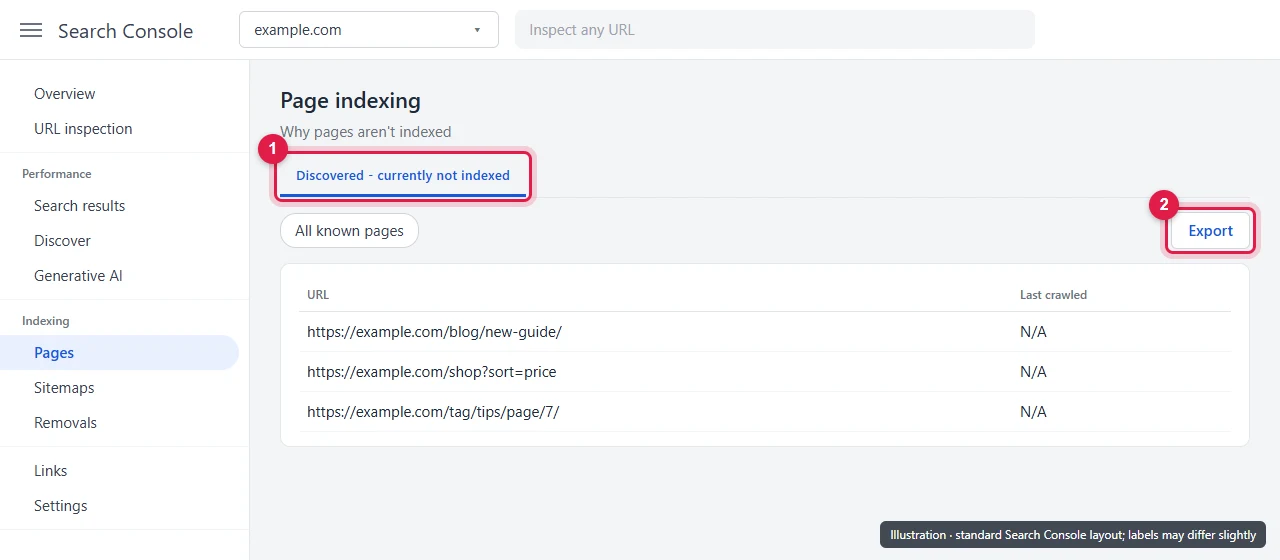
The screens below are illustrations based on Search Console’s standard layout. Your labels may differ slightly.
Step 1: Export the affected URLs
Open Indexing → Pages, click Discovered – currently not indexed, then Export. Search Console shows up to 1,000 example URLs.
Step 2: Check your server in Crawl Stats
Open Settings → Crawl stats. Look at the Host status box and the Average response time chart. Rising response times or availability warnings point to cause 1.
Step 3: Inspect a few URLs
Paste three or four stuck URLs into URL Inspection and click Test live URL. If the live test fails with a server or hostload problem, fix your hosting first. If it passes, move on to linking and URL inventory.
Step 4: Run the checker
This short Python script checks every exported URL for the common causes in one go. It uses only standard Python, so there’s nothing to install.
#!/usr/bin/env python3
"""Check URLs from Search Console's "Discovered - currently not indexed" list."""
import argparse, csv, re, sys, time, urllib.request, urllib.error
from html.parser import HTMLParser
from urllib.parse import urljoin, urldefrag, urlparse

UA = "Mozilla/5.0 (compatible; discovered-checker/1.0)"


class Page(HTMLParser):
    """Collects links, robots meta and canonical. With content_only, only links inside the
    main post body (WordPress "entry-content") are counted."""

    def __init__(self, content_only=False):
        super().__init__()
        self.links, self.noindex, self.canonical = set(), False, ""
        self.content_only, self.inside, self.tag, self.nest = content_only, False, "", 0

    def handle_starttag(self, tag, attrs):
        a = dict(attrs)
        if self.inside and tag == self.tag:
            self.nest += 1
        elif not self.inside and "entry-content" in (a.get("class") or ""):
            self.inside, self.tag, self.nest = True, tag, 1
        if tag == "a" and a.get("href") and (not self.content_only or self.inside):
            self.links.add(a["href"])
        elif tag == "meta" and (a.get("name") or "").lower() in ("robots", "googlebot"):
            self.noindex |= "noindex" in (a.get("content") or "").lower()
        elif tag == "link" and "canonical" in (a.get("rel") or "").lower():
            self.canonical = a.get("href") or ""

    def handle_endtag(self, tag):
        if self.inside and tag == self.tag:
            self.nest -= 1
            if self.nest == 0:
                self.inside = False


def fetch(url, delay):
    time.sleep(delay)
    req = urllib.request.Request(url, headers={"User-Agent": UA})
    start = time.time()
    try:
        with urllib.request.urlopen(req, timeout=30) as r:
            body = r.read().decode("utf-8", "ignore")
            return {"status": r.status, "final": r.geturl(), "secs": round(time.time() - start, 2),
                    "xrobots": r.headers.get("X-Robots-Tag", ""), "body": body}
    except urllib.error.HTTPError as e:
        return {"status": e.code, "final": url, "secs": round(time.time() - start, 2), "xrobots": "", "body": ""}
    except Exception as e:
        return {"status": f"error: {type(e).__name__}", "final": url, "secs": None, "xrobots": "", "body": ""}


def norm(u):
    u = urldefrag(u)[0]
    return u if urlparse(u).path.endswith("/") or "." in urlparse(u).path.rsplit("/", 1)[-1] else u + "/"


def sitemap_urls(url, delay, seen=None):
    seen = seen or set()
    if url in seen:
        return []
    seen.add(url)
    body = fetch(url, delay)["body"]
    locs = re.findall(r"<loc>\s*([^<\s]+)\s*</loc>", body)
    if "<sitemapindex" in body:
        out = []
        for child in locs:
            out += sitemap_urls(child, delay, seen)
        return out
    return locs


def read_urls(path):
    text = open(path, encoding="utf-8-sig").read()
    found = re.findall(r"https?://[^\s,\"']+", text)
    return list(dict.fromkeys(norm(u) for u in found))


def main():
    ap = argparse.ArgumentParser()
    ap.add_argument("--urls", required=True)
    ap.add_argument("--sitemap", required=True)
    ap.add_argument("--out", default="discovered_check.csv")
    ap.add_argument("--delay", type=float, default=1.0)
    ap.add_argument("--max-pages", type=int, default=500, help="max sitemap pages to crawl for link counts")
    ap.add_argument("--content-only", action="store_true", help="count only links inside the post body")
    a = ap.parse_args()

    targets = read_urls(a.urls)
    print(f"{len(targets)} URLs to check. Reading sitemap...")
    in_map = [norm(u) for u in sitemap_urls(a.sitemap, a.delay)]
    in_map_set = set(in_map)
    inlinks = {u: 0 for u in targets}
    print(f"{len(in_map)} URLs in sitemap. Counting internal links from up to {a.max_pages} of them...")
    for page in in_map[: a.max_pages]:
        r = fetch(page, a.delay)
        p = Page(a.content_only); p.feed(r["body"])
        for href in {norm(urljoin(page, h)) for h in p.links}:
            if href in inlinks and href != norm(page):
                inlinks[href] += 1

    rows = []
    for u in targets:
        r = fetch(u, a.delay)
        p = Page(); p.feed(r["body"])
        canon = norm(urljoin(u, p.canonical)) if p.canonical else ""
        problems = []
        if r["status"] != 200:
            problems.append(f"status {r['status']}")
        if norm(r["final"]) != u:
            problems.append("redirects")
        if p.noindex or "noindex" in r["xrobots"].lower():
            problems.append("noindex")
        if canon and canon != norm(r["final"]):
            problems.append("canonical points elsewhere")
        if r["secs"] and r["secs"] > 2:
            problems.append("slow response")
        if u not in in_map_set:
            problems.append("not in sitemap")
        if inlinks[u] == 0:
            problems.append("no internal links found")
        elif inlinks[u] == 1 and a.content_only:
            problems.append("only 1 internal link")
        rows.append({"url": u, "status": r["status"], "response_secs": r["secs"], "noindex": p.noindex,
                     "canonical": canon, "in_sitemap": u in in_map_set, "internal_links": inlinks[u],
                     "likely_issues": "; ".join(problems) or "none found"})
    with open(a.out, "w", newline="", encoding="utf-8") as f:
        w = csv.DictWriter(f, fieldnames=list(rows[0])); w.writeheader(); w.writerows(rows)
    print(f"\nWrote {a.out}")
    for r in rows:
        print(f"  {r['internal_links']:>3} links | {str(r['status']):>5} | {r['likely_issues']:<45} | {r['url']}")


if __name__ == "__main__":
    sys.exit(main())
Save it as discovered_checker.py, then run it with your export and sitemap:
python discovered_checker.py --urls discovered.csv --sitemap https://yoursite.com/sitemap_index.xml --content-only
It crawls politely, one page at a time with a one-second gap, so a large sitemap takes a while. Use --max-pages to limit how many sitemap pages it reads when counting links.
What happened when we ran it on SEOMate1
We tested the script on our own site on 28 September 2026. We fed it five live pages and one fake URL, and pointed it at our sitemap. This is SEOMate1 observed, not Google documentation.
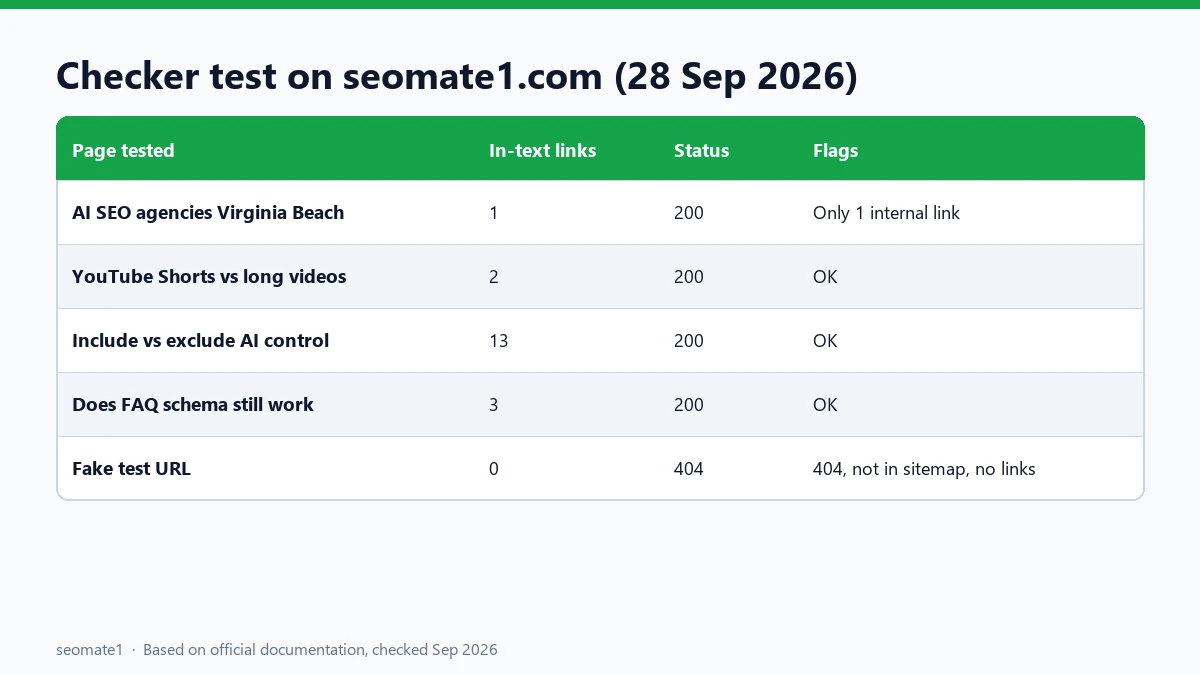
Two things stood out:
- The fake URL was caught straight away: 404, not in the sitemap, no internal links.
- Sidebar and “latest posts” widgets distort link counts. Without
--content-only, our newest posts showed 22 internal links each, because the theme links recent posts from every page. With--content-only, the real in-text counts were 1, 2, 3 and 13. Those numbers matched a separate link audit we ran on the same pages. An older post only had 3 real links, once the widget stopped listing it.
That second point is worth knowing. As a page gets older, it drops out of “recent posts” widgets and quietly loses links. It’s one reason older pages can slip into “Discovered” long after launch.
Fixes that work
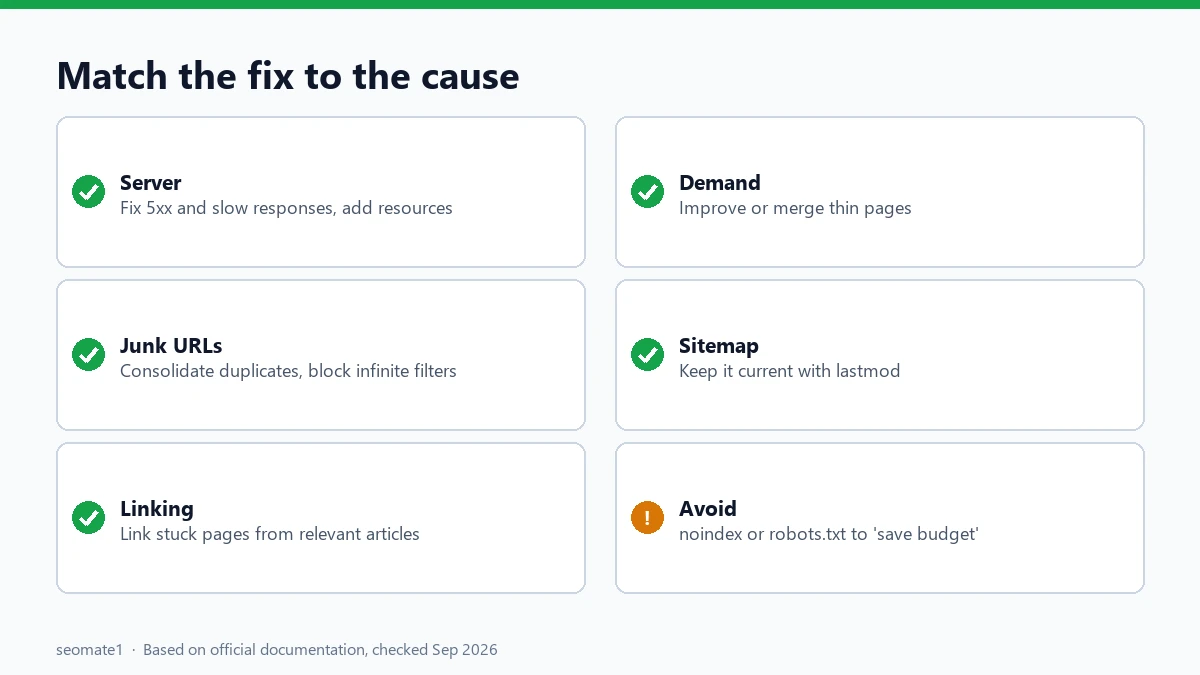
Match the fix to the cause:
- Server problems: fix 5xx errors and slow responses, and upgrade hosting if Crawl Stats shows availability issues. Google’s crawl budget guide suggests adding server resources when you see “Hostload exceeded”.
- Low-value URLs: consolidate duplicates. Block crawling of infinite spaces (filters, sorting, internal search) with robots.txt, and return 404 or 410 for pages you’ve removed for good. Here’s what robots.txt does and doesn’t control.
- Weak linking: add links to stuck pages from relevant, established pages, inside the text where they help the reader. Don’t rely on menus or widgets.
- Low demand: improve or merge thin pages. A smaller set of strong pages is crawled more willingly than a large set of weak ones.
- Sitemaps: keep them current and include
<lastmod>for updated pages, as Google recommends. Remove URLs you don’t want indexed.
Things that don’t help (or make it worse)
- Adding noindex to “save crawl budget”. Google says don’t: it “will still request, but then drop the page when it sees a noindex meta tag… wasting crawling time”.
- Using robots.txt to shift crawling temporarily. Google says blocked capacity won’t move to other pages “unless Google is already hitting your site’s crawl capacity limit”.
- Requesting indexing for hundreds of URLs. It’s fine for a few key pages, but it doesn’t fix the underlying cause.
- Returning 503 or 429 for long periods. Google’s Crawl Stats help warns against doing that for more than two or three days.
- Resubmitting the same sitemap every day. Google already reads sitemaps regularly.
FAQ
How long does “Discovered – currently not indexed” last?
Google doesn’t give a timeline. On a healthy site, newly published pages often move on within days to a few weeks. If important pages are still stuck after about a month, work through the causes above.
Should I click “Validate fix” for this issue?
Only after you’ve changed something. Validation rechecks the URLs, but Google says it can detect fixed issues even if you never start validation.
Can this status affect my AI Overview visibility?
Indirectly, yes. A page Google hasn’t crawled can’t be indexed, and can’t appear in regular results or AI features. If your generative AI report looks empty, unindexed pages may be part of the reason.
Is it the same as “Crawled – currently not indexed”?
No. “Discovered” means Google hasn’t fetched the page yet. “Crawled” means it fetched the page and chose not to index it. The fixes are different.
Last checked against Google’s Page indexing, Crawl budget and Crawl Stats documentation on 28 September 2026. Checker script tested on seomate1.com on 28 September 2026.
Make it easier to find our SEO, AI search and digital marketing coverage in Google.

Nadir Yaqoob
Nadir Yaqoob is the founder and editor of SEOMate1. He has more than 10 years of experience in SEO, and today focuses on AI search: helping SaaS and e-commerce brands stay visible in Google's AI Overviews and AI Mode, and turn search traffic into leads. He's based in Lahore, Pakistan.