
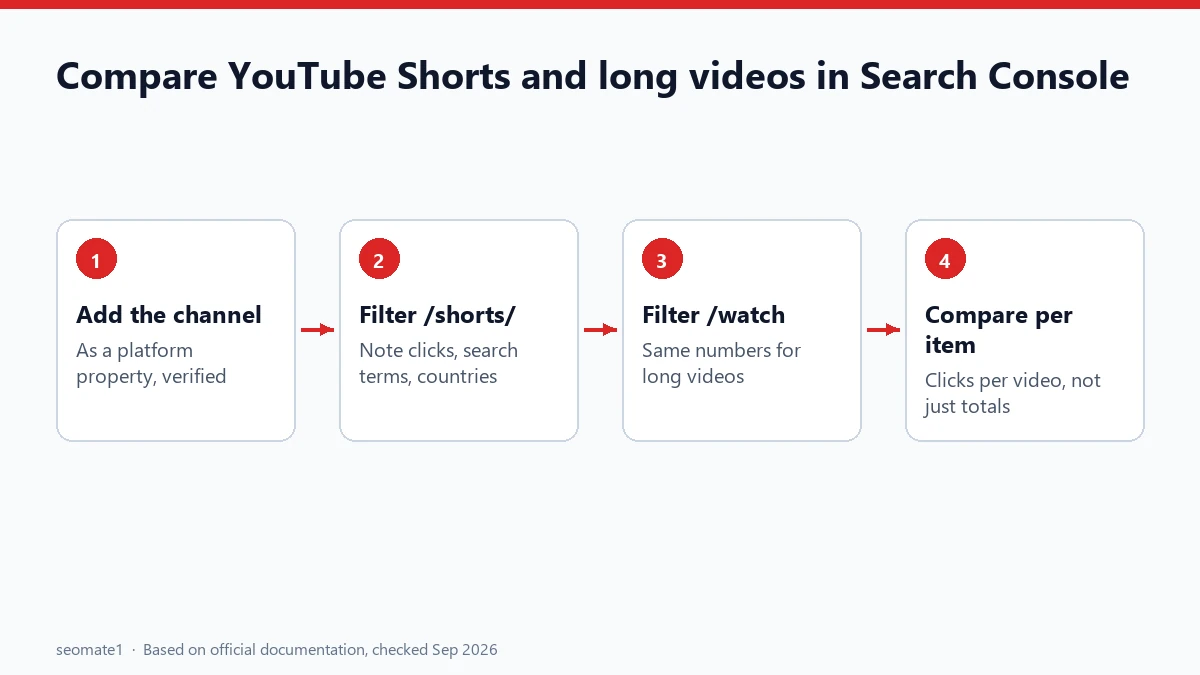
To compare YouTube Shorts with long videos in Search Console, add your YouTube channel as a platform property, then split your content by URL. Shorts have /shorts/ in their address, and long videos have /watch. Google’s own guide recommends exactly this comparison. You’ll see how many Google Search clicks each format gets, and which searches lead people to each one.
YouTube Studio can’t tell you this. It shows what happens on YouTube, not what people searched on Google before they arrived.
Why compare Shorts and long videos in Google Search?
Most creators judge formats by YouTube Studio numbers: views, watch time, subscribers. Google Search is a separate source of viewers, and the two formats often behave very differently there.
- A long tutorial might get steady Google clicks for “how to” searches for years.
- A Short might get a burst of Google clicks for a trending search, then fade.
Knowing which format Google sends people to, for which searches, helps you decide what to make next.
Step 1: Add your YouTube channel to Search Console
Google’s guide to analyzing social and video content says you add and verify each account separately from the Search Console welcome page. If you’ve claimed a Google Search profile, your verified accounts are added automatically. (A Search profile also comes with a badge for your website. Here’s how the Search Profile badge compares with the Preferred Sources button.)
Step 2: Filter by URL to split the formats
Google’s guide suggests comparing formats by their URLs:
| Format | URL pattern | Example |
|---|---|---|
| Shorts | contains /shorts/ |
youtube.com/shorts/abc123 |
| Long videos | contains /watch |
youtube.com/watch?v=xyz789 |
In the performance data for your YouTube property, filter the content by URL. Look at /shorts/ first, then /watch. Note the clicks, the top search terms, and the countries for each.
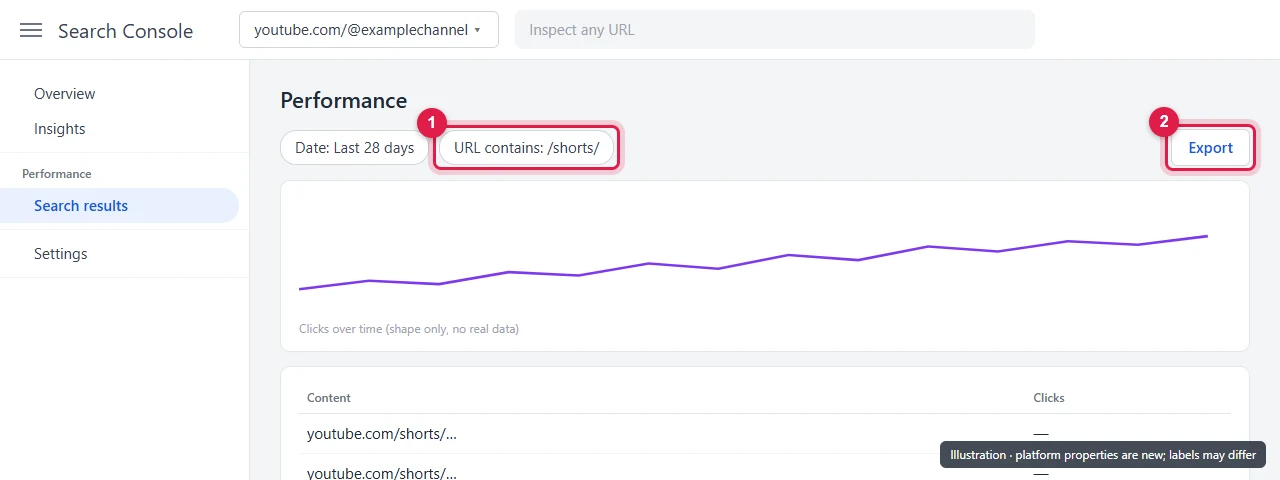
The screen above is an illustration. Platform properties are new, and your Search Console layout may differ slightly.
Step 3: Compare the two groups (or let a script do it)
For a quick look, the filtered numbers are enough. For a proper comparison, export the content list and split it with this short script. It uses only standard Python:
#!/usr/bin/env python3
"""Split a Search Console export for a YouTube platform property into Shorts vs long videos."""
import csv, re, sys


def num(v):
    v = (v or "").replace(",", "").replace("%", "").strip()
    return float(v) if re.fullmatch(r"-?\d+(\.\d+)?", v) else 0.0


def kind(url):
    if "/shorts/" in url:
        return "Shorts"
    if "/watch" in url:
        return "Long videos"
    return "Other (channel, playlists)"


rows = list(csv.DictReader(open(sys.argv[1], encoding="utf-8-sig")))
url_col = next(c for c in rows[0] if "page" in c.lower() or "url" in c.lower() or "content" in c.lower())
clk = next(c for c in rows[0] if "click" in c.lower())
imp = next((c for c in rows[0] if "impression" in c.lower()), None)

totals = {}
for r in rows:
    k = kind(r[url_col])
    t = totals.setdefault(k, {"items": 0, "clicks": 0.0, "impressions": 0.0})
    t["items"] += 1
    t["clicks"] += num(r[clk])
    if imp:
        t["impressions"] += num(r[imp])

print(f"{'Type':<28}{'Items':>7}{'Clicks':>9}{'Clicks/item':>13}{'CTR':>8}")
for k, t in sorted(totals.items(), key=lambda x: -x[1]["clicks"]):
    ctr = f"{100 * t['clicks'] / t['impressions']:.1f}%" if t["impressions"] else "n/a"
    print(f"{k:<28}{t['items']:>7}{int(t['clicks']):>9}{t['clicks'] / t['items']:>13.1f}{ctr:>8}")
Save it as shorts_vs_videos.py and run python shorts_vs_videos.py your-export.csv.
We tested it on 24 September 2026 with a sample file laid out like a Search Console export. The sample had two Shorts, two long videos and a channel page. It produced this summary:
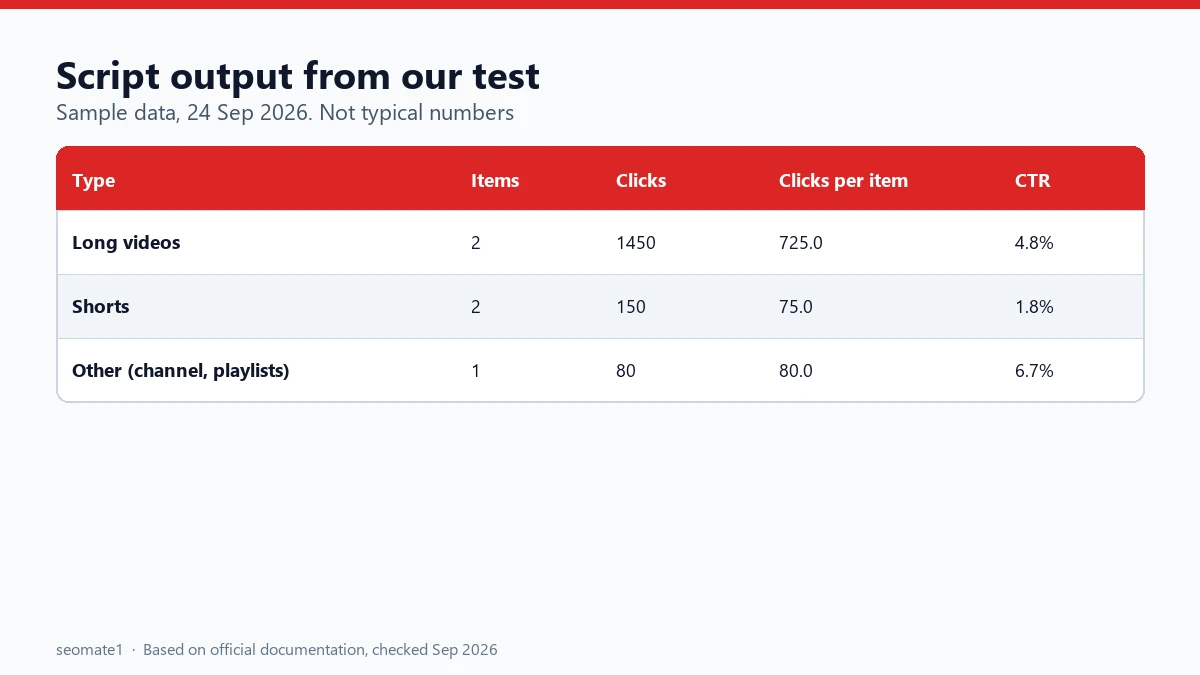
The numbers come from our made-up test file, so don’t read them as typical. The useful column is clicks per item. A format with fewer videos but more clicks per video is doing more of the work in Google Search.
Step 4: Read the results
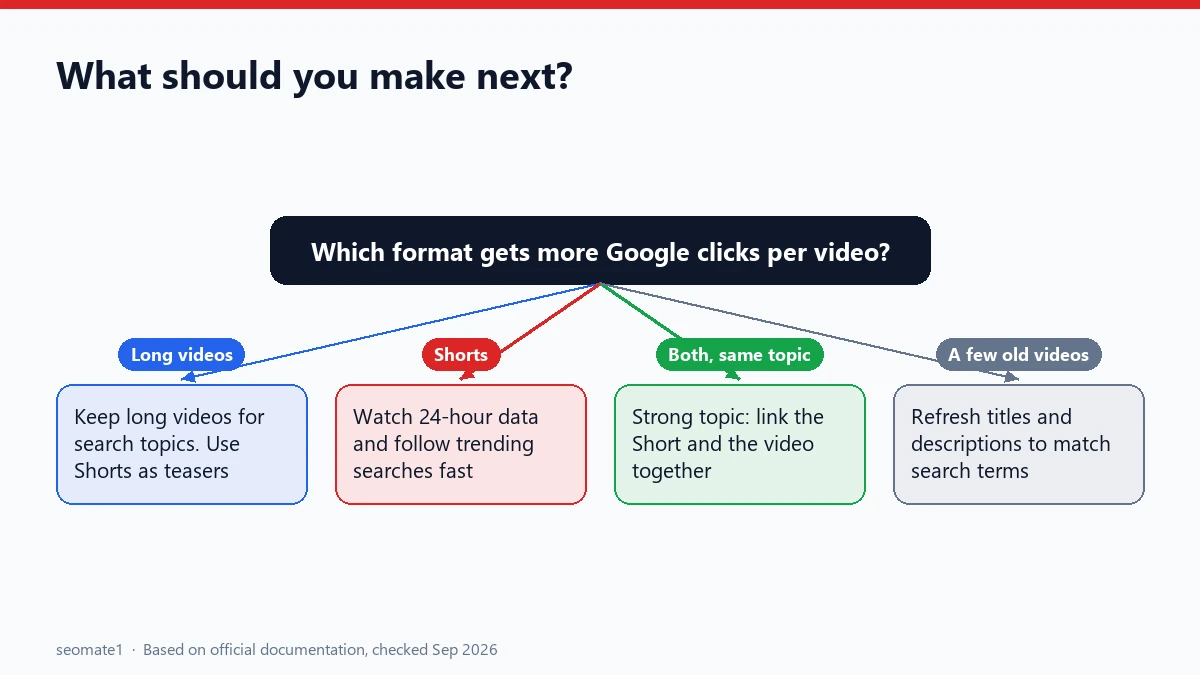
Here’s how to turn the comparison into decisions. These are patterns to look for, not rules:
Long videos get most Google clicks
This is common for “how to” and explainer content. Keep making long videos for search topics. Use Shorts as teasers that point viewers to the full video.
Shorts get Google clicks for trending searches
Check the 24-hour data, which is also one of the things Search Console shows that YouTube Studio and other app analytics don’t. If a Short picks up clicks for a search term that just started trending, a quick follow-up Short or a longer video on the same topic can catch the rest of that interest.
A few old videos carry most of the traffic
Those videos answer searches people keep making. Update their titles and descriptions to match the search terms Search Console shows. A newer version can also help.
Both formats get clicks for the same search
That’s a strong topic. Link the Short and the long video to each other in descriptions and pinned comments. The same comparison works for exports from any tool, and it’s the idea behind our Search Console vs GA4 landing-page comparison.
What this comparison can’t tell you
- Watch time and retention. Those are in YouTube Studio only.
- Views from YouTube’s own search. Search Console only covers Google Search.
- Why a video ranks. It shows what’s working, not the reason.
That’s why this works best alongside YouTube Studio. More on how the two sets of data fit together: does Search Console replace your social analytics?
Common mistakes
- Comparing totals only. If you have 200 Shorts and 20 long videos, total clicks will mislead you. Use clicks per item.
- Forgetting the channel page. Your channel URL gets Google clicks too. The script puts it in its own group, “Other”.
- Using a short date range. One viral Short can skew a single week. Look at 28 days or more.
- Ignoring search terms. The clicks tell you which format. The search terms tell you what to make.
FAQ
Does Search Console show YouTube Shorts separately?
Not as its own report. Google’s guide suggests separating them by URL, since Shorts use /shorts/ and long videos use /watch.
Do I need YouTube Studio access to add the channel?
You need to be able to verify the account in Search Console. Google’s guide covers the verification steps for each platform.
Can I compare Instagram Reels and posts the same way?
Yes. Google’s guide uses the same idea: Reels have /reels/ in the URL and posts have /p/.
Last checked against Google’s documentation on 24 September 2026. Script tested with sample data on 24 September 2026.
Make it easier to find our SEO, AI search and digital marketing coverage in Google.

Nadir Yaqoob
Nadir Yaqoob is the founder and editor of SEOMate1. He has more than 10 years of experience in SEO, and today focuses on AI search: helping SaaS and e-commerce brands stay visible in Google's AI Overviews and AI Mode, and turn search traffic into leads. He's based in Lahore, Pakistan.