
robots.txt tells crawlers which URLs they may fetch. Google-Extended is a name you use inside robots.txt to control whether Google may use your content to train Gemini models. It has no effect on Google Search. llms.txt is an unofficial file that summarises your site for AI tools, and Google Search doesn’t use it.
None of the three removes you from AI Overviews. For that, use the Search generative AI control in Search Console, or nosnippet on single pages.
People mix these up because all three sound like “AI settings”. Below is what each one really does, with examples we tested.
The short version
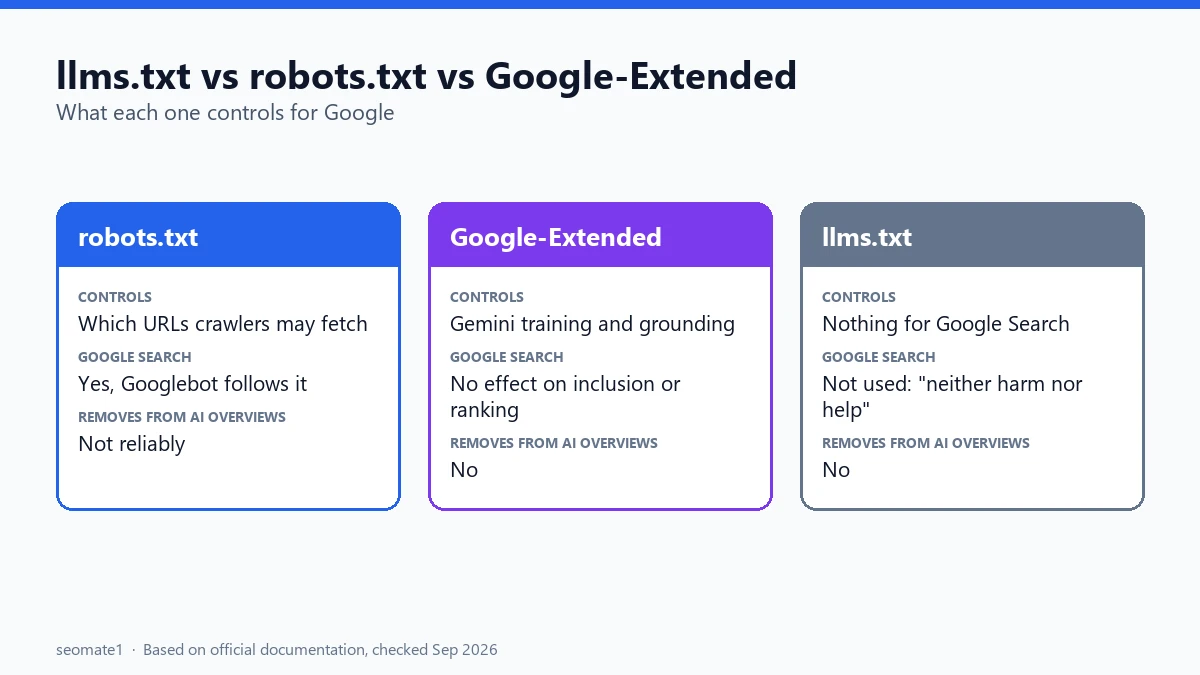
| robots.txt | Google-Extended | llms.txt | |
|---|---|---|---|
| What it is | A standard file at /robots.txt |
A user-agent token used inside robots.txt | An unofficial Markdown file at /llms.txt |
| What it controls | Which URLs crawlers may fetch | Use of your content for Gemini training and grounding | Nothing, for Google Search |
| Affects Google Search ranking | Only indirectly (blocked pages can’t be crawled) | No | No |
| Removes you from AI Overviews / AI Mode | Not reliably | No | No |
| Read by Google Search | Yes | Yes (as a robots.txt rule) | Not used |
robots.txt: who may crawl what
Google’s robots.txt introduction describes robots.txt as a way to “manage crawler traffic”. It tells crawlers which URLs they can access. Each group of rules starts with a User-agent line naming the crawler it applies to.
Two things to keep in mind:
- It’s a request, not a lock. Well-behaved crawlers follow it. Others may not.
- It controls crawling, not indexing. A URL blocked in robots.txt can still show up in Google if other sites link to it. To keep a page out of Google, use
noindex, and let Google crawl the page so it can see that tag.
Google-Extended: training, not Search
Google’s list of common crawlers describes Google-Extended as a token web publishers can use “to manage whether content Google crawls from their sites may be used for training future generations of Gemini models”. It also covers grounding in Gemini Apps and Vertex AI.
The most important sentence on that page: “Google-Extended does not impact a site’s inclusion in Google Search nor is it used as a ranking signal in Google Search.”
Google-Extended isn’t a separate crawler that visits your site. It’s a name you write in robots.txt. Googlebot still does the crawling.
We tested it
We wrote this robots.txt and checked it with Python’s standard robots.txt parser (urllib.robotparser) on 24 September 2026:
User-agent: Google-Extended
Disallow: /

User-agent: GPTBot
Disallow: /

User-agent: *
Allow: /
The results:
| Crawler | May fetch /guide/? |
|---|---|
| Googlebot | Yes |
| Google-Extended | No |
| GPTBot | No |
| Bingbot | Yes |
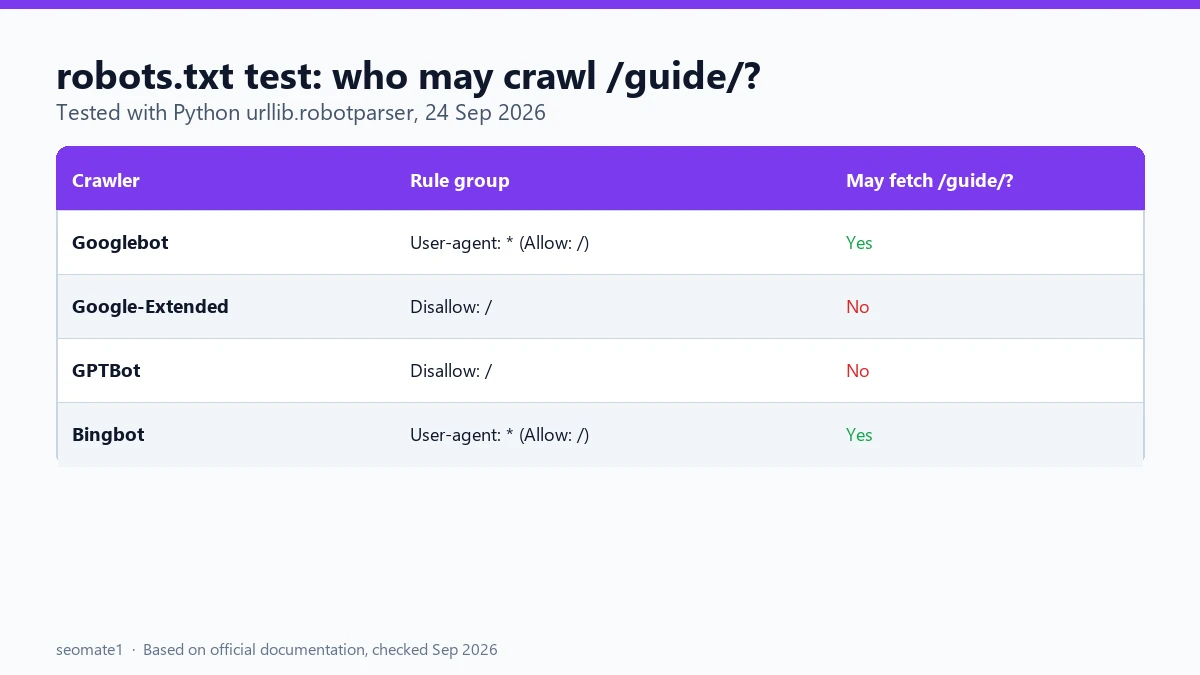
So blocking Google-Extended doesn’t stop Googlebot from crawling your pages for Search. Only the training and grounding use changes. GPTBot is OpenAI’s crawler. Other AI companies publish their own user-agent names, so check each company’s documentation for the current name before you add a rule.
llms.txt: a summary file Google Search doesn’t use
llms.txt is a proposed convention, not a standard. It’s a Markdown file at yoursite.com/llms.txt that lists your key pages with short descriptions, so AI tools can read a summary instead of crawling everything.
Google has been direct about it. Its guide to AI features in Search (updated July 2026) says you don’t need “new machine readable files, AI text files, markup, or Markdown” to appear in Google Search. It adds that llms.txt files and other “special” markup “neither harm nor help your site’s visibility.”
“But Google’s own Lighthouse checks for llms.txt”
This is the source of the “Google is saying two different things” posts. In May 2026, Chrome’s Lighthouse tool added an Agentic Browsing category with an llms.txt audit. Chrome describes llms.txt as “an emerging convention used to provide a machine-readable summary of a website’s content, specifically designed for LLMs and AI agents”.
There’s no real conflict, once you read what the audit checks:
- It only flags server errors when Lighthouse tries to fetch
/llms.txt. - If the file doesn’t exist (a normal 404), the audit is marked Not Applicable, “as providing the file is optional at the moment”.
- The Chrome page doesn’t mention Google Search at all.
So Lighthouse is about AI agents browsing your site, not about Google Search rankings. The practical lesson: if you don’t have an llms.txt, make sure /llms.txt returns a clean 404, not a 500 error.
Your SEO plugin may have made one already
When we checked our own site, seomate1.com/llms.txt returned a working file (status 200). Our SEO plugin, Rank Math, had created it automatically. It lists our sitemap and posts with their descriptions. Check yours by visiting yoursite.com/llms.txt. It’s harmless for Google Search either way.
So how do you control AI Overviews?
None of the three files above does it. Google gives you two real options:
- The Search generative AI control in Search Console (Settings → Search generative AI). Exclude removes your whole property from AI Overviews, AI Mode, and generative AI features in Discover. Normal search results stay the same. Here’s what Include and Exclude change.
nosnippetormax-snippeton single pages. Google’s robots meta tag docs saynosnippetstops content being used as a direct input for AI Overviews and AI Mode, andmax-snippetlimits how much can be used. Both also affect normal snippets.
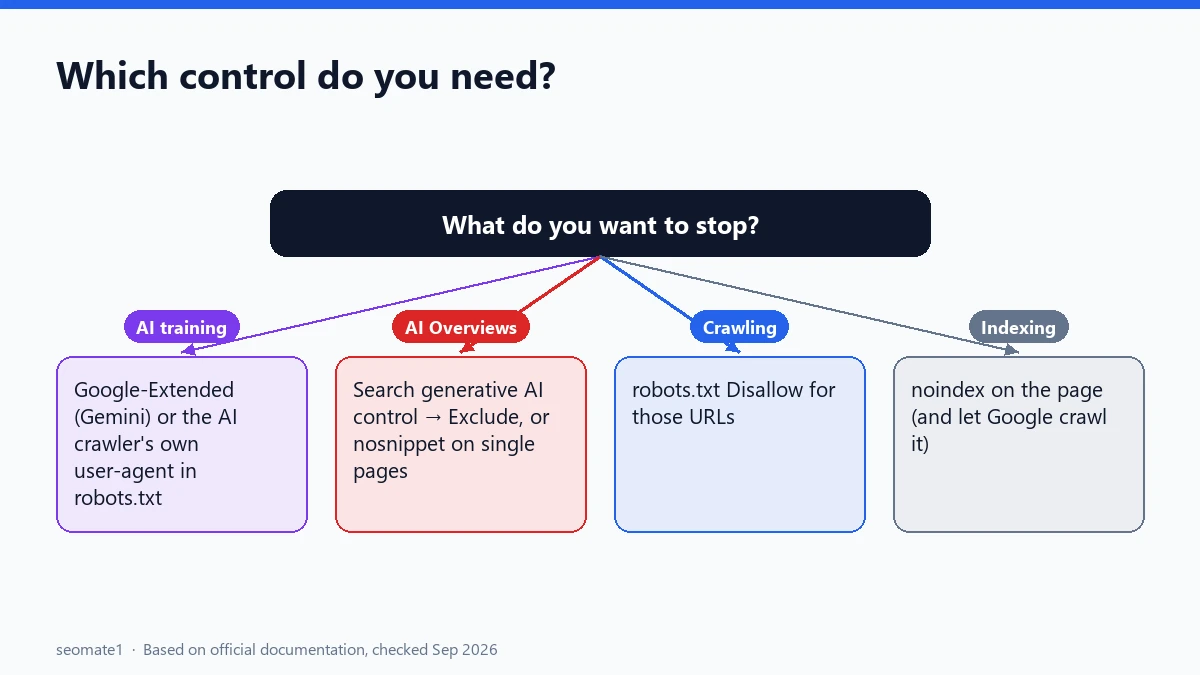
Which one do you need?
| You want to… | Use |
|---|---|
| Stop Gemini training on your content | Google-Extended in robots.txt |
| Stop OpenAI or another AI company’s crawler | Its user-agent name in robots.txt |
| Stay out of AI Overviews and AI Mode (whole site) | Search generative AI control → Exclude |
| Keep one page’s text out of AI answers | nosnippet or max-snippet |
| Keep a page out of Google completely | noindex |
| Stop crawlers wasting time on some URLs | robots.txt Disallow |
| Rank better in Google’s AI features | Normal SEO. Google says llms.txt won’t help |
Common mistakes
- Blocking Googlebot to “stop AI”. That removes you from normal search too. Use Google-Extended or the Search generative AI control instead.
- Expecting llms.txt to get you into AI Overviews. Google says it has no effect on Search.
- Using robots.txt to hide a page from Google. Blocked pages can still be indexed from links. Use
noindex. - Letting
/llms.txtreturn an error. Harmless for Search, but Lighthouse will flag it. - Adding FAQ schema to win AI answers. Google stopped showing FAQ rich results in May 2026, so here’s what to do with FAQ schema now.
FAQ
Should I create an llms.txt file?
For Google Search, no. It won’t help or hurt. It may be useful for developer documentation sites that AI coding tools read. Some AI tool makers publish llms.txt files for their own docs. If your SEO plugin already makes one, you can leave it.
Does blocking Google-Extended remove me from AI Overviews?
No. Google-Extended covers Gemini training and grounding in Gemini Apps and Vertex AI. AI Overviews and AI Mode are part of Search, which Google-Extended doesn’t affect. Use the Search generative AI control for that.
Does robots.txt affect my generative AI report?
Only indirectly. If Googlebot can’t crawl a page, it can’t appear anywhere in Search, AI features included. If your report is empty, check the other reasons the generative AI report doesn’t show.
Last checked against Google’s and Chrome’s documentation on 24 September 2026. robots.txt rules tested with Python’s urllib.robotparser on 24 September 2026.
Make it easier to find our SEO, AI search and digital marketing coverage in Google.

Nadir Yaqoob
Nadir Yaqoob is the founder and editor of SEOMate1. He has more than 10 years of experience in SEO, and today focuses on AI search: helping SaaS and e-commerce brands stay visible in Google's AI Overviews and AI Mode, and turn search traffic into leads. He's based in Lahore, Pakistan.