In Search Console, a click on a link to your site inside AI Mode counts as a normal click. Impressions follow the standard rules. Position is worked out the same way as on a regular Google results page. The part most people miss is that every follow-up question in AI Mode counts as a new query, with its own impressions, clicks and position.
All of this data sits in the main Performance report, under the Web search type, mixed in with regular search results. The newer generative AI report shows only the impressions.
The rules at a glance
| Metric | How AI Mode counts it |
|---|---|
| Click | A click on a link to an external page in AI Mode |
| Impression | Standard impression rules apply |
| Position | Same method as a Google Search results page |
| Follow-up question | Treated as a brand-new query |
These rules come from Google’s help page on what impressions, position and clicks are. Below, each one is explained in plain terms, with examples.
A quick reminder of the basics, since they apply to AI Mode too:
- Impression: your link was shown to someone.
- Click: someone clicked your link and left Google for your site.
- Average position: where your highest link sat, averaged across all the searches where you appeared. Lower is better. 1 is the top.
Clicks: only clicks that leave Google count
A click is counted when someone clicks a link in the AI Mode answer that takes them to an external page, meaning your site.
Going by that rule, these don’t count as clicks to your site:
- expanding or scrolling the AI Mode answer
- clicking a link that keeps the user inside Google
- typing a follow-up question
So if AI Mode quotes your page and the user gets their answer without clicking, you may get an impression but no click. That’s one reason AI features can show high impressions and a low click-through rate for the same page.
Impressions: the normal rules
Google says AI Mode uses the standard impression rules. In simple terms, an impression is counted when a link to your site is shown to the user in the results.
There’s a difference between the two reports:
- In the main Performance report, AI Mode impressions follow the same rules as other search results.
- In the generative AI report, Google says several links to your site in one AI answer count as one impression.
So don’t expect the two reports to match exactly for the same page and date.
Position: the same method as a normal results page
Google says position in AI Mode “follows the same methodology as a Google Search results page”. The position Search Console shows for a query is the topmost position your site held, averaged across all the searches in your date range.
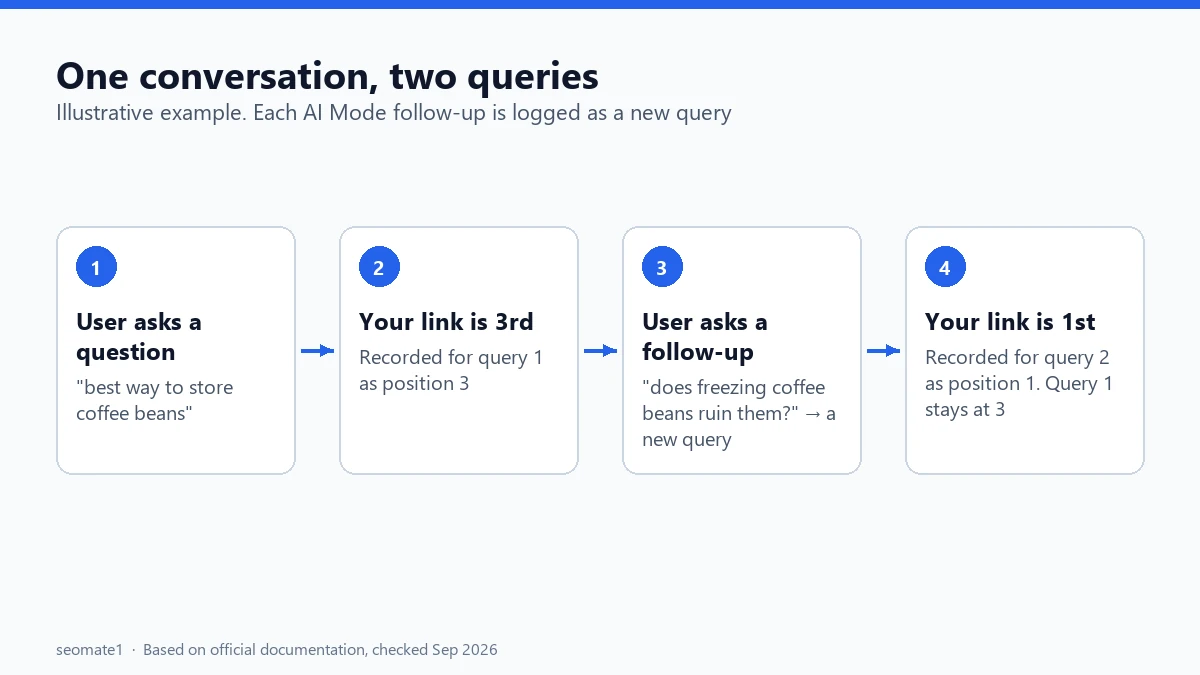
Here’s a simple made-up example to show how this works in practice. The numbers are for illustration only.
- A user asks AI Mode, “best way to store coffee beans”.
- Your page is the third link in the answer. For that query, your position is recorded as 3.
- The user then asks, “does freezing coffee beans ruin them?”
- Your page is now the first link. That’s recorded against the new query as position 1. It doesn’t change the first query’s position.
This is different from AI Overviews. In an AI Overview, the whole box takes up one position on the page, and every link inside it gets that same position. That single-position rule catches a lot of people out, so we’ve covered how AI Overview position is counted separately.
Follow-up questions: why your query list looks strange
Because every follow-up counts as a separate query, you may see long, very conversational queries in your Performance report. They can look like full sentences someone typed in a chat.
Some of these are follow-ups inside AI Mode. Search Console doesn’t tag them as follow-ups, so you can’t be certain which ones they are. Long, natural-language queries are a reasonable sign, but treat that as a guess, not a label.
Also, Google hides very rare queries to protect user privacy. Long conversational queries are often rare, so many of them won’t appear in your query list at all. Their clicks and impressions still count in your totals.
A regex filter to spot likely AI Mode queries
Search Console lets you filter queries with a regular expression. Here’s how:
- Open Performance → Search results.
- Click + Add filter and choose Query.
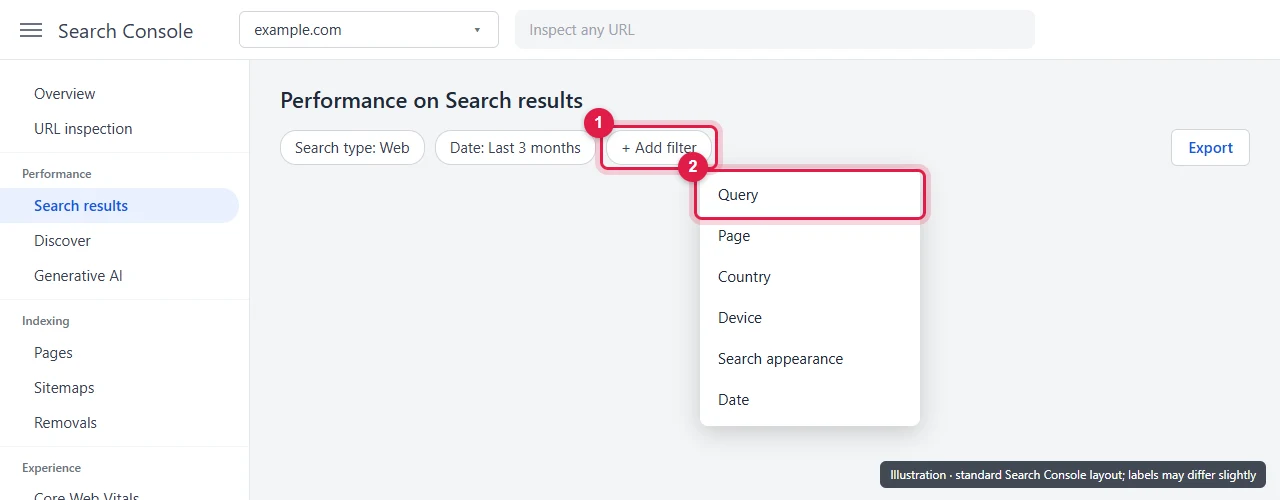
- Change the filter type to Custom (regex), paste one of the patterns below, and apply it.
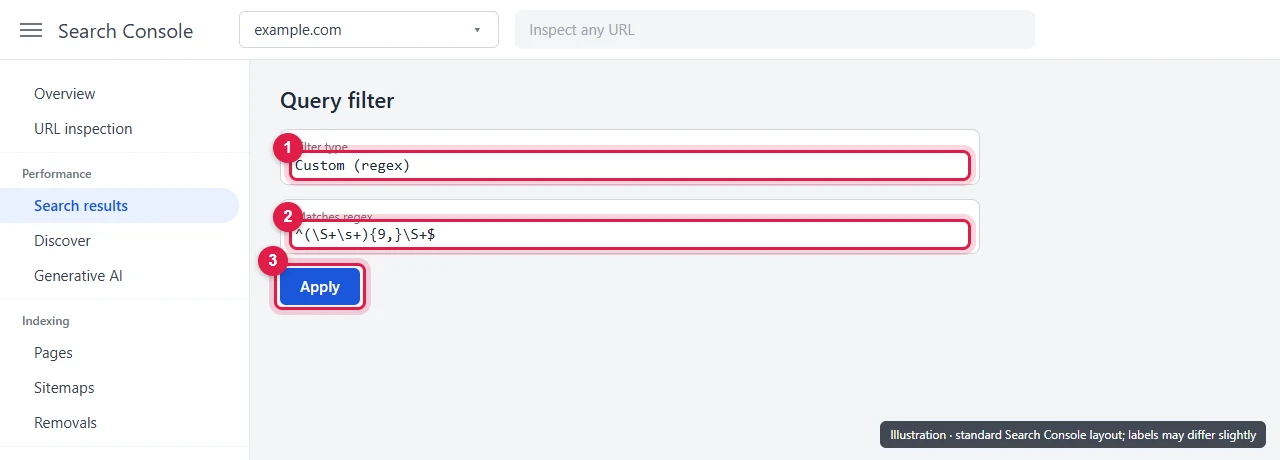
To find very long queries (10 words or more):
^(\S+\s+){9,}\S+$
To find queries that start like a follow-up question:
^(what about|how about|what if|and |but |also |can you|could you|is it|does it|do i|should i|which one|compare )
We tested both patterns on a set of sample queries. The first one caught “is it safe to exclude my whole site from ai overviews if i run a news site” and skipped short queries like “best crm”. The second one caught “what about for subdomains” and “does it affect rankings”.
These are rough filters. They’ll catch some normal searches and miss some AI Mode follow-ups, and they only work for English. Use them to find patterns, not to measure AI Mode traffic exactly.
What to do with them: Look for questions that repeat across pages. If people keep asking a follow-up your page doesn’t answer, add a short, direct section that answers it.
Can you see AI Mode data on its own?
Only partly.
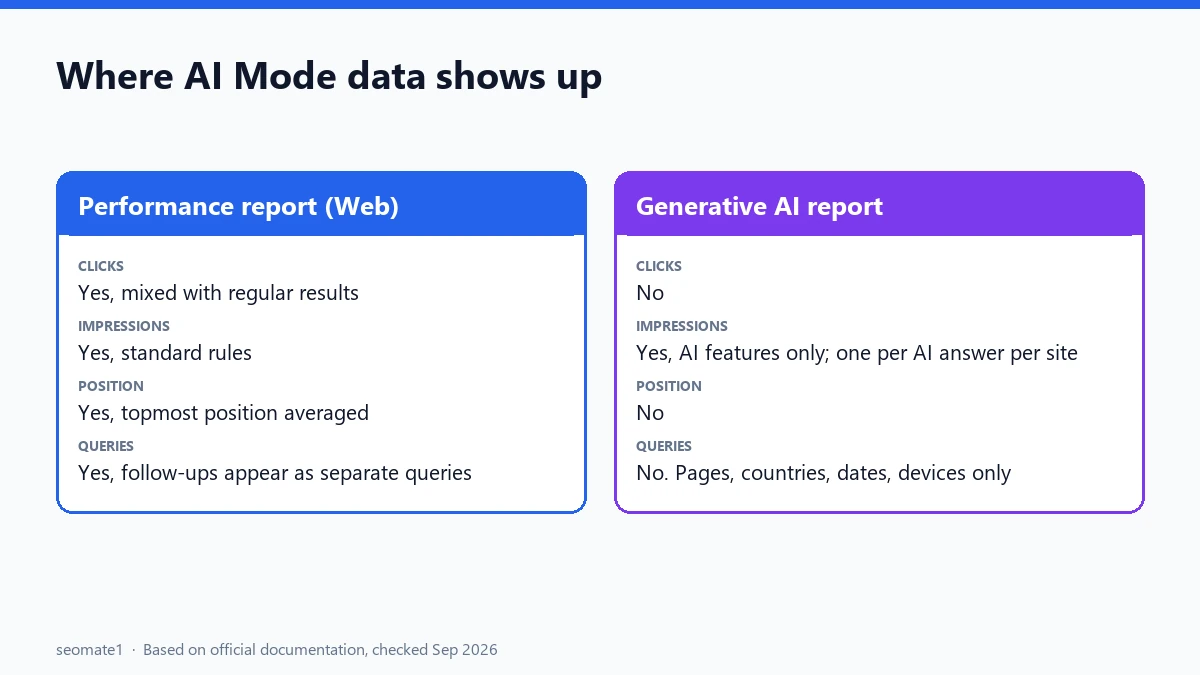
- Main Performance report (Web search type): includes AI Mode clicks, impressions and position, but mixed with regular results. When we checked Google’s help pages in September 2026, none of them described a filter that separates AI Mode clicks from other clicks.
- Generative AI report: shows impressions from AI Overviews and AI Mode on their own, by page, country, date and device. It doesn’t show clicks or queries.
A practical workaround is to compare the two. For each page, put its AI impressions (from the generative AI report) next to its total Web impressions and clicks (from the Performance report). Pages with a large share of AI impressions and falling clicks are worth a closer look. Our guide to exporting the generative AI report includes a small script that does this join for you.
Common misunderstandings
- “AI Mode traffic isn’t tracked.” It is. It’s in the Web search type of the Performance report, just not labelled separately.
- “My position dropped, so AI Mode hurt me.” Not necessarily. New follow-up queries with lower positions can pull your average down even if nothing changed for your main queries. Check query by query before drawing conclusions.
- “The two reports disagree, so one is wrong.” They count impressions differently, so small differences are expected.
FAQ
Does AI Mode count as organic search traffic?
In Search Console, yes. AI Mode clicks are included in the Web search type with other organic results.
Why can’t I find AI data in my report at all?
If your property has no generative AI report, or it’s empty, work through the reasons the generative AI report isn’t showing. The most common one is simply not having enough AI impressions yet.
Is AI Mode data included in the Search Console API?
Yes, but mixed in. AI Mode data is part of the web search type. The Search Analytics API lets you group by country, device, page, query, search appearance, date and hour. None of its documented options mentions AI Mode, so you can’t pull AI Mode clicks on their own.
What is a good average position?
There’s no single good number. It depends on the query and on what else is on the page. For AI Mode, remember that the position is inside the AI answer, not the list of blue links. Compare a page’s position with its own history, query by query, rather than chasing a target number.
Can I see AI Mode data in BigQuery bulk export?
Google’s documentation doesn’t describe any AI Mode or generative AI field in the bulk export. It carries the same Performance data, so AI Mode rows are mixed in with the rest.
Why do I have AI impressions but zero clicks?
People often get their answer inside AI Mode without clicking. A page that is shown but rarely clicked may need a clearer reason to visit, like a tool, a template, or detail the AI answer can’t give in full.
Last checked against Google’s documentation on 23 September 2026.
Make it easier to find our SEO, AI search and digital marketing coverage in Google.

Nadir Yaqoob
Nadir Yaqoob is the administrator and SEO contributor at SEOMate1, covering SEO, AEO, GEO, AI search, software, and digital marketing. I write practical, research-driven content on search strategies, emerging technologies, and digital workflows to help businesses improve their online visibility and growth.